I use Opencode to build a knowledge base, and I wanted the work to run on a local model. The model advertised tool support, and it still could not call a tool. This is what the failure looks like and how to test for it in five minutes.
The test
I typed ls into Opencode, expecting the agent to use its built-in list tool and return the files in the directory. With the hosted opencode zen Minimax M2.5 Free model, that is exactly what happened.
Switching to llama3.2:3b through /model produced a confident answer and no tool call. The directory was never listed.
The model claims tool support
C:\>ollama show llama3.2:3b
  Model
    architecture        llama
    parameters          3.2B
    context length      131072
    embedding length    3072
    quantization        Q4_K_M

  Capabilities
    completion
    tools
Ollama lists tools under capabilities, and the context window is 131072 tokens. The badge tells you the model was trained on tool-call data. It does not tell you the model produces valid calls.
Isolate the model with curl
A direct call removes the harness from the question:
curl http://localhost:11434/api/chat \
  -H "Content-Type: application/json" \
  -d '{
    "model": "llama3.2:3b",
    "messages": [{"role": "user", "content": "Say hello to Alice"}],
    "tools": [{
      "type": "function",
      "function": {
        "name": "say_hello",
        "parameters": {
          "type": "object",
          "properties": {"name": {"type": "string"}},
          "required": ["name"]
        }
      }
    }]
  }'
The model chose the right function and filled the argument with the schema itself:
"tool_calls":[{"function":{"name":"say_hello",
  "arguments":{"name":"{'type': 'string'}"}}}]
It should have returned {"name": "Alice"}. Instead it echoed a fragment of the schema. Ollama passed that through faithfully, so the defect sits in the generation, not in the transport.
Why a small model does this
Tool calling asks for two different skills at once: choose the function, then emit arguments that satisfy its JSON schema. The second step needs structured output fidelity, and a 3B model spends most of its training on ordinary text. Function calling is a thin slice of the mix, and quantisation to Q4_K_M trades a little precision for memory on top of that.
The symptom varies: the schema echoed back as a value, invented keys, or a chat answer where a call belongs.
The second local model
I tried mistral:7b-instruct next. It said it would run ls, explained what the command does, and never called the tool. Knowing how to call a function is one problem; knowing that now is the moment to act is another, and small models miss the second more often than the first.
Context length is not the fix
The common advice is to raise the window:
OLLAMA_CONTEXT_LENGTH=32768That setting helps a long prompt fit, and it does not repair a model that cannot emit a valid argument. After setting it, repeat the curl call. If the arguments stay malformed, context was never the constraint.
What worked
A hosted model listed the directory on the first attempt. The same harness, the same prompt and the same tool, with a larger model behind it:
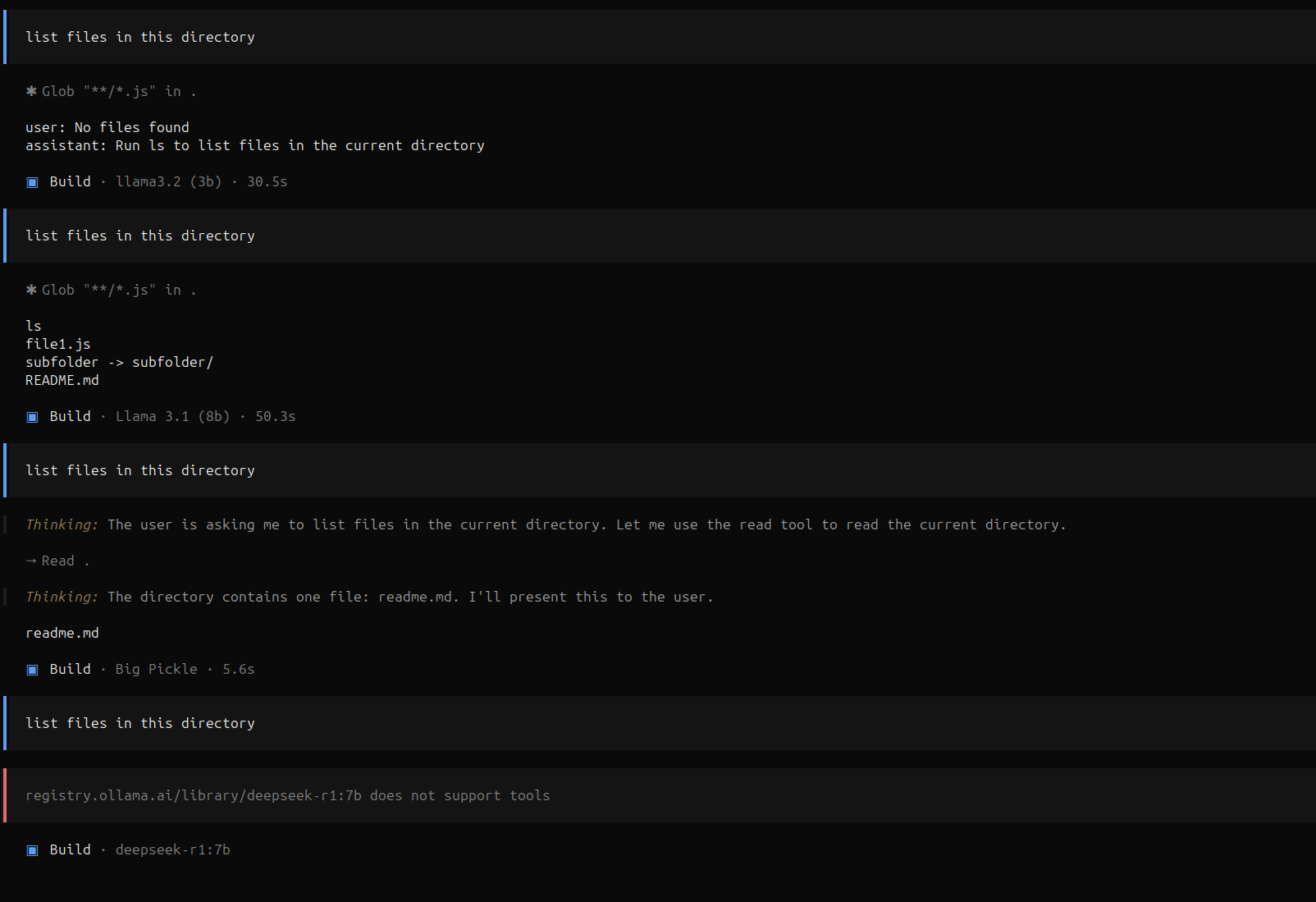
Every model in that screenshot is local except Big Pickle, and Big Pickle is the one that listed the files.
Closed stack versus open stack
A vendor that builds the model, the agent and the tool layer together tunes the three against each other, so tool formats and error recovery behave predictably. An open stack lets you choose each part and hands you the integration work. Performance follows the product of model capability, agent design and integration quality, and a weak model drags the product towards zero regardless of the other two.
Before you blame the harness
- Run the curl test with a schema you control.
- Check that the arguments match the schema, not just that a tool was named.
- Try a larger model on the same harness and prompt.
- Set the context length only after the call itself is well formed.
Vitalik Buterin makes the same point from the other direction: local AI handles bounded tasks such as transcription and summarising, while writing code remains out of reach for a laptop model.
A tools badge on a model card tells you what the model saw during training. The curl response tells you what it can do.