
I have been using opencode (and other agent harnesses) on my local Ubuntu machine. I usually give permission "always allow" once it asks for things like "ls" and "cat". Recently after doing this it went and read some personal documents and most definitely sent that over the internet to the model provider.
This is the risk and there is nothing stopping it from reading files that are unencrypted while logged in – such as ~/.ssh/id_ed25519 or finding some way to get the browser secrets.
The answer is isolating / sandboxing the place where the agent runs – so one can give it lenient permissions without it exposing data you do not want it to.
What is an AI agent sandbox?
An AI agent sandbox is an isolated environment that constrains what a coding agent can read, write, and reach over the network while it works. Instead of trusting an agent with your whole machine, you give it a bounded filesystem, a controlled set of credentials, and a defined network policy – so you can grant lenient permissions without exposing secrets like ~/.ssh/id_ed25519 or your browser data.
The core distinction in this article is code isolation versus agent isolation: some tools sandbox only the code an agent generates, while others sandbox the agent itself. Agent isolation is what most people actually want when they say "sandbox my AI agent".
TL;DR
A table of the evaluated ai agent sandbox tools along with a subjective rating
| Sandbox | isolation | size | focus | subjective rating |
|---|---|---|---|---|
| nono | host confinement | tiny | developer first | 9 |
| fence | host confinement | tiny | developer first | 9 |
| microsandbox | microVM | large | developer/agent first | 8.5 |
| zerobox | host confinement | tiny | developer first | 8 |
| cplt | host confinement | tiny | developer first | 8 |
| agentbox | container based | 5 GB | full service dev | 8 |
| agent-infra all-in-one sandbox | container based | 13.1 GB | full service dev | 7 |
| Opensandbox | container based | large | agent builders | 7 |
| Direct docker cli sandbox | container based | large | developer first | 6 |
| Sandbase-harness | mixed | large | agent builders | 6 |
| Arrakis | microVM | large | agent builders | 5 |
| Opencode Sandbox | container based | large | developer first | 5 |
| BunkerVM | firecracker or host confinment | agent builders | 5 | |
| Yolobox | container based | ~6 GB | developer/agent first | 3 |
| Sandbox AI | container based | large | agent builders | 1 |
Key facts:
- Best for local dev / my daily driver:
nono(9/10, tiny, host confinement, runner-upfence). - Best for risky code:
microsandbox(8.5/10, microVM). - Heaviest: Agent Infra all-in-one (13.1GB).
- Key distinction: agent isolation (agent lives inside) vs code isolation (only code runs inside).
- Tested on Ubuntu with opencode v2, Oct 2026.
What agent sandbox options are there?
Sandboxes for AI agents differ mainly in where the isolation boundary sits:
- Host confinement (kernel policy) –
nono,fence,cplt,zerobox. Landlock (Linux), Seatbelt (macOS), or bubblewrap restrict the agent’s own process. Near-native speed, no VM or container. - Container isolation – direct Docker, Agent Infra, Yolobox, Agentbox, OpenSandbox, Opencode Sandbox, SandboxAI. The agent runs in a container that shares the host kernel.
- MicroVM / hardware isolation – Microsandbox, Arrakis, BunkerVM. A separate kernel per sandbox: strongest isolation, heaviest setup.
The second axis is agent isolation vs code isolation: who lives inside the boundary – the agent itself, or only the code it generates.
These are options I found via a Google-assisted search and the awesome-agent-sandboxes readme, focusing on self-hosted tools.
The 15 sandboxes I tested
Tested on Ubuntu with opencode v2, October 2026. Grouped by where the isolation boundary sits.
Host confinement (kernel policy)
- nono – A Secure Sandbox for AI Agents
- fence – Lightweight, container-free sandbox for running commands with network and filesystem restrictions
- cplt – Sandbox for AI coding agents. Runs Copilot CLI, Claude Code, OpenCode, Gemini CLI, Antigravity, Pi, goose or a plain shell inside a kernel-level sandbox, with git and gh guards and sandbox policy committed to the repository.
- zerobox – Sandbox any command with file, network, and credential controls.
Some I recently discovered that I need to test:
- landrun – Run any Linux process in a secure, unprivileged sandbox using Landlock
- litterbox – Somewhat Isolated Development Environments
- shai – sandboxing shell for ai coding agents
- openshell – OpenShell is the safe, private runtime for autonomous AI agents
Container-based
- Direct Docker CLI sandbox
- Agent Infra all-in-one sandbox – All-in-One Sandbox for AI Agents that combines Browser, Shell, File, MCP and VSCode Server in a single Docker container
- yolobox – Let your AI go full send. Your home directory stays home.
- Agentbox – Run multiple agents in parallel sandboxed VMs, with a single command, on your PC or in the cloud
- OpenSandbox – Secure, Fast, and Extensible Sandbox runtime for AI agents.
- Opencode Sandbox – Modified docker based sandbox specifically for opencode
- Sandbox AI – Run AI generated code in isolated sandboxes
MicroVM-based
- Microsandbox – easy, fast, programmable and local-first microVM runtime and library
- Arrakis – A fully customizable and self-hosted sandboxing solution for AI agent code execution and computer use
- BunkerVM – Time-travel debugging for AI agent sandboxes with firecracker vm
Full agent runtimes
- sandbase-harness – Local-first, self-hosted AI agent runtime and MCP bridge with sandboxed sessions, memory, credentials, audit/replay, and a local Console.
Skipped
- Docker Sandboxes – skipped as it requires a docker account login to use them
- Daytona Sandboxes – appears to require login
- Flintlock – Not a sandbox, used to lifecycle management of microVMs.
- Rivet agents – Not clear if it is fit for purpose from the readme.
- Sandboxer – looks like a playground for a talk that has not been updated recently
- Mudroom – Run coding agents in a Linux VM on a clone of your project, then review and apply their changes like a pull request. Skipped as it only supports macOS (
bash install.sh→error: Mudroom only runs on macOS, could not test on Ubuntu). - Bouvet – Isolated code execution sandboxes for AI agents. Spins up a lightweight microVM in ~200ms per request (separate kernel/filesystem/network, destroyed when done, code isolation not agent isolation, target: agent builders). Skipped as default image did not support my CPU architecture and required a custom
amd64build.
How I evaluated these sandboxes
All testing was done on a local Ubuntu machine with opencode. I scored each option on the same axes: how isolated the agent actually is, how much setup was involved, documentation quality, image or runtime weight, and whether the agent runs inside the sandbox (agent isolation) or merely calls it as a tool (code isolation).
The ratings are deliberately subjective and reflect a developer-first use case – I want to run opencode, not build an agent platform. Where a tool targets agent builders or requires a hosted account, that is reflected in the score.
Threat model limits
No sandbox stops exfiltration via the allowed LLM API itself — if the agent can read it, it can send it. Prefer credential injection over env vars, never mount your full home directory, and never give a sandbox unrestricted Docker socket access (Docker-as-root = host access).
Direct Docker CLI sandbox
Create a project folder and add 3 files…
Dockerfile:
# Use a lightweight, official Python runtime
FROM python:3.11-slim

# Set the working directory inside the container
WORKDIR /app

# Ensure standard system tools are available for Python development
RUN apt-get update && apt-get install -y --no-install-recommends \
    git \
    curl \
    ca-certificates \
    && rm -rf /var/lib/apt/lists/*

# Run the official installation script inside the container
RUN curl -fsSL https://opencode.ai/v2/install | bash

# Automatically map the custom installer binary directory to the global system PATH
ENV PATH="/root/.opencode/bin:${PATH}"

# Keep the container running in the background so you or your scripts can execute commands
CMD ["tail", "-f", "/dev/null"]
docker-compose.yml
services:
  opencode-sandbox:
    build: .
    container_name: opencode_python_sandbox
    # Vital flags for interactive command line interfaces (TUI)
    stdin_open: true
    tty: true
    # Mount ONLY the current directory into the container's /app folder
    volumes:
      - .:/app
    # Pass necessary OpenCode and LLM API environment variables from host to container
    environment:
      - OPENCODE_API_KEY
      - OPENCODE_MODEL
      - ANTHROPIC_API_KEY
      - OPENAI_API_KEY
    # Keeps network completely open for external API calls/installations
    network_mode: bridge
    # web ui ports
    ports:
    - "4096:4096"
and opencode.json (make edits where needed)
{
  "$schema": "https://opencode.ai/config.json",
  "disabled_providers": [
    "github-copilot",
    "anthropic",
    "openai"
  ],
  "enabled_providers": [
    "opencode",
    "opencode-go"
  ],
  "model": "opencode/space-bunny-free",
  "small_model": "opencode/space-bunny-free"
}
Steps:
-
Set your AI key on the host env
export OPENCODE_API_KEY="your-opencode-key" -
Build and run the container
docker compose up -d -
Run opencode
docker compose exec -it opencode-sandbox opencode
Verdict: Best for simple Docker dev. Rating 6/10 | Isolation: agent – Simple for simple tasks, more complex when needing skills and plugins for the agent, multiple services and more dependencies. Requires work and a unique set up.
Agent Infra: All in One Sandbox
From the intro it states that it is multi-purpose (browser, code or terminal) and most other sandboxes are single purpose.
- combines Browser, Shell, File, MCP operations, and VSCode Server in a single Docker container.
- Can run agent inside the sandbox or agent-calls-sandbox (agent on host calls the sandbox via MCP)
- Supports docker compose but most docs reference direct
docker run - Has examples which mainly using agent-calls-sandbox approach
- Provides a browser based dashboard to access code (vscode), browser, terminal and jupyter notebook. Can also go to each tab directly.
- Massive when uncompressed image 13.1GB
There were some struggles with updating opencode, it had an older version 1.4.6 baked in and the usual upgrade paths did not work. The documentation is good.
It is a heavy weight image but will work if you have a strong pc and enjoy coding in a browser.
Verdict: Best for full-service browser dev. Rating 7/10 | Isolation: agent + code
Arrakis
A much more complex setup using KVM and microVMs – although there is a bash script you can download, read and run.
- Target audience is
agent builderswho don’t want to pay for cloud VMs and have microVMs run locally. Probably forred-teamingsecurity analysts and for running model benchmark tests. - The agent runs outside the VM. Arrakis is a tool-calling sandbox, not a place the agent lives. Isolates the code, not the agent
- It seems to be built more for people trying to test agents
- The agent writes code and runs in the sandbox VM
- table stakes (the minimum requirement) is agent code isolation. The features are snapshot, restore and rollback.
- Uses Cloud Hypervisor
Typical flow
- Agent decides it needs to run something → calls run_command
- MCP server POSTs to
localhost:7000/v1/vms/{name}/cmd - Host daemon forwards over vsock → cmdserver inside the VM → output comes back
- Agent reads output, loops
The sandbox is long-lived and reused; what changes per task is the agent’s context. Snapshot when the agent hits a good state, destroy/relaunch for a clean task.
Config on the agent will do the routing to the arrakis mcp for typical tool calls that should be sandboxed.
You can start a microVM and run commands on it directly with something like this:
#!/usr/bin/env bash
set -euo pipefail
API=http://127.0.0.1:7000/v1
VM=demo

run() {
  curl -sS -XPOST "$API/vms/$VM/cmd" \
    -H 'content-type: application/json' \
    -d "$(jq -nc --arg c "$1" '{cmd:$c,blocking:true}')" | jq -r '.output // .error'
}

echo "CANARY-$(date +%s)-do-not-leak" > ~/.arrakis_canary   # plant a secret on the HOST
./arrakis-client start -n "$VM"

echo "=== 1. is this really a VM? ==="
run 'uname -a; whoami; hostname; ip -4 -o addr show scope global'

echo "=== 2. can the VM read the host secret? ==="
run "cat $HOME/.arrakis_canary || echo '  -> BLOCKED: host secret not visible'"

echo "=== 3. can the VM see host project files? ==="
run "ls $PWD || echo '  -> BLOCKED: host project dir not visible'"

echo "=== 4. write in VM, try to read from host ==="
run 'echo VM_ONLY_MARKER > /tmp/proof.txt && echo "  wrote /tmp/proof.txt inside VM"'
cat /tmp/proof.txt 2>/dev/null && echo "  -> LEAK" || echo "  -> BLOCKED: host cannot see VM /tmp"
Or tell the agent about the tool:
opencode mcp add arrakis -- ~/.local/bin/uv --directory "$PWD/arrakis-mcp-server" run arrakis_mcp_server.py --arrakis-url http://127.0.0.1:7000/v1Note that this does not mean code is automatically sandboxed, it is the agent’s choice – so yeah what is the point then if we cannot enforce the sandbox use.
It is not built with agent isolation as the goal – and has a lot of components.
Verdict: Best for agent builders testing microVMs. Rating 5/10 | Isolation: code
BunkerVM
Time-travel debugging for AI agent sandboxes.
- rewind and diff tool
- agent-calls-sandbox architecture
- Built for agent-calls-sandbox
- Limited docs and small community
Verdict: Best for time-travel debugging of agent code. Rating 5/10 | Isolation: code
SandboxAI
Run AI generated code in isolated sandboxes
- Target is agent developers – ie. Code isolation not agent isolation
- Uses docker containers
- Quicker and less complex setup
- No MCP Server (so you cannot direct your agent for tool execution)
- Sparse documentation
- Seems a proof of concept
- Not updated for 1 year
Verdict: Proof-of-concept only. Rating 1/10 | Isolation: code
Microsandbox
Microsandbox runs untrusted workloads inside fast, local microVMs: AI agents, user code, plugins, CI jobs, dev environments, scrapers, and automation.
- Setting up and running the example works well
- The example for using a SDK specifically for running code within a spun up microsandbox does not seem relevant to my use case
- Uses libkrun
- Very good docs
- Gives a useful example to quickly use a sandbox per project folder. Consider using a single VM for multiple projects though if space is constrained.
- How to guides for browser, code-server (vscode on browser), vnc, jupyter
What I used:
Install:
curl -fsSL https://install.microsandbox.dev | bashRun a sandbox
msb run -t --name opencode --replace \
  --cpus 2 --memory 2G --root-disk 4G \
  -v "$PWD:/workspace" \
  -w /workspace \
  -e OPENAI_API_KEY \
  python:3.12-slim -- bash
apt update
apt-get install -y --no-install-recommends ca-certificates git curl
curl -fsSL https://opencode.ai/v2/install | bashExec into
msb exec -t opencode -- bashInstall as a command
Add
--tmpif you want it to be removed on close. I didn’t want to keep installing opencode and other packages while testing.
msb install --name opencode-project \
  --cpus 2 --memory 2G \
  --mount-dir ./:/workspace:rw --workdir /workspace \
  --mount-named opencode-config:/root/.config/opencode \
  --mount-named opencode-data:/root/.local/share/opencode \
  --mount-named opencode-state:/root/.local/state/opencode \
  -e OPENAI_API_KEY \
  python:3.12-slim -- sh -lc 'apt-get update && apt-get install -y --no-install-recommends ca-certificates git curl && curl -fsSL https://opencode.ai/v2/install | bash && exec bash'
Create a sandbox for given project:
opencode-projectRemove command:
msb uninstall opencode-projectI think it is good and allows for agent isolation and extras. Not perfect still requires a bit of reading and customisation.
Verdict: Best for risky code in microVMs. Rating 8.5/10 | Isolation: agent.
Nono
nono is a capability-based security shell that leverages kernel-level primitives to sandbox AI agents and untrusted processes
- Containers are heavyweight, complex and overkill
- Kernel-enforced restrictions – no VM or container
- Downloads profile from registry – not OCI container
- Goes one step further – stopping the sharing of credentials with the entire shell via env variables using OS secret tools
- Makes use of Linux Landlock and macOS Seatbelt
- No Windows compatibility
- Confines the process via OS kernel policy (Landlock/Seatbelt), not a VM or container – lighter, but still relies on the host kernel
- Good documentation and active community of developers
- You can use nono with containers for greater isolation and resource limits.
Example usage:
nono pull nolabs-ai/opencode
nono run --profile nolabs-ai/opencode -- opencode --standalone
View policy:
nono profile show nolabs-ai/opencodeSimplest and most lightweight solution so far. Also most similar for someone deving locally. Things just work but there are caveats for example giving the agent access to docker (as root) will give access to the host.
Verdict: Best for local dev — my daily driver. Rating 9/10 | Isolation: agent
Fence
Fence is a policy-driven wrapper for running semi-trusted commands
- Container-free – uses OS/platform policy like macOS Seatbelt or Linux bubblewrap
- Fence exists to reduce the blast radius of running commands you don’t fully trust or don’t fully understand
- Running
npm installon unfamiliar repos, running bash scripts and wrapping AI agents - Can configure your agent to run an agent hook on the PreToolUse hook.
- Good docs
Run a coding agent:
fence -t code -- opencodeSimilar to nono above.
Verdict: Best for local dev, runner-up to nono. Rating 9/10 | Isolation: agent
Yolobox
Let your AI go full send. Your home directory stays home.
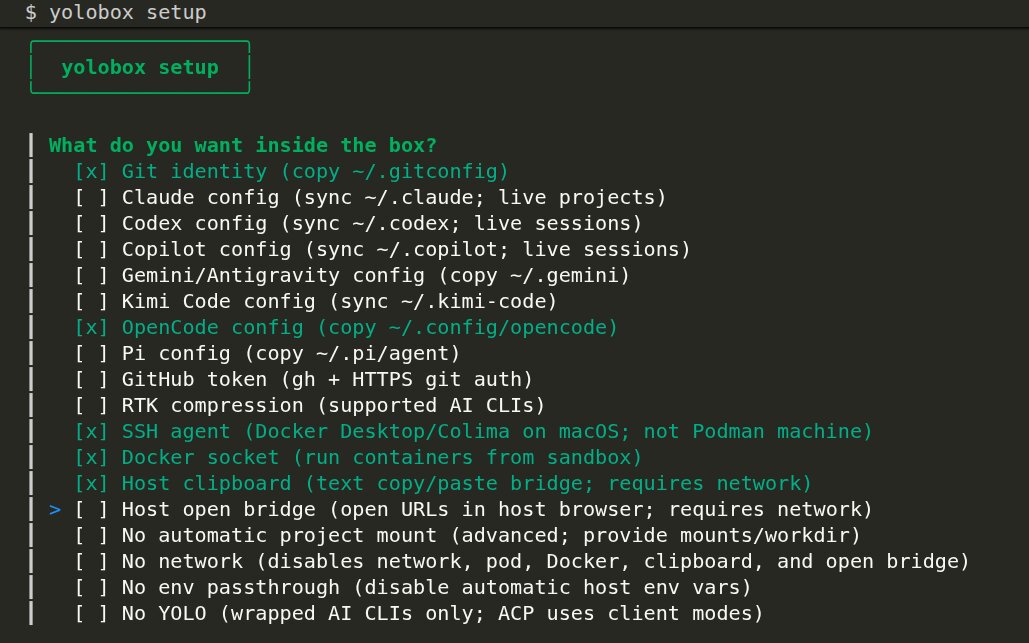
- Has a setup flow to walk you through config – which agent harness, what should be in the box, etc
- Setup failed for opencode – opencode-ai’s postinstall script was not run
- container based isolation
- Container image size: 5.62GB
- Vibe coded by a solo dev
Too much work to get it to run though. Still getting a post install script error. Really promising start but in practice did not work.
Perhaps a different agent would work better.
Verdict: Promising but failed setup. Rating 3/10 | Isolation: agent
Agentbox
Run multiple agents in parallel, with a single command, on your PC, self-hosted, or in the cloud
- container based isolation
- good documentation
- just works after initial run
- 5 GB container
- no bind mount – one has to upload/download to workspace. Not sure why this was done but does add complexity and potential for loss of code.
- long running agents via detached tmux session
- Has built in browser
- Comes with portless url for easier access to box via http and code-server (vscode over http)
- works with local docker along with other providers like digitalocean, hetzner, daytona, vercel and e2b
- Pause, resume and checkpoints…
- Kind of complex
- Not clear how to update opencode to v2…opencode v1 comes built in
Still unsure of :
- how to properly sync files
- Give a more permissive opencode.json…seems to be copying from the host each time
Very promising sandbox. Just got a bit complex.
Verdict: Best for parallel full-service dev. Rating 8/10 | Isolation: agent.
OpenSandbox
Secure, Fast, and Extensible Sandbox runtime for AI agents.
- Good documentation
- Uses container isolation
- Targeted more at agent builders – for agent-calls-sandbox / MCP integration
Verdict: Best for agent builders. Rating 7/10 | Isolation: code
Opencode Sandbox
- Container based isolation
- Uses mise a tool for bootstrapping a dev env
- Makes use of squid that blocks traffic except for whitelist domains. The forked project switches this to allow by default with a blacklist.
ocs-webto start an opencode web- Not that mature, docs are sparse.
Install
git clone git@github.com:aral190/opencode-sandbox.git
export PATH="/path/to/opencode-sandbox/bin:$PATH"
Run
# root of project
ocs-init

ocs-start-container
ocs-web # find the password in ./.opencode-sandbox dir
Workflow:
- First time setup
ocs-initthenocs-start-container - Daily use
ocs-start-container - After changing
mise.toml:ocs-rebuild-containerthenocs-start-container - After changing
opencode-sandbox-config.yaml:ocs-rebuild-containerthenocs-start-container - Stop the container:
Ctrl+Cin theocs-start-containerterminal (container is removed)
Noticed one or two bugs. Was not seamless.
Verdict: Best for opencode-specific Docker dev. Rating 5/10 | Isolation: agent.
cplt
Kernel-enforced sandbox for AI coding agents
- Uses Seatbelt and Landlock
- Decent readme and dedicated docs site
- Docs were in Norwegian
Verdict: Best for kernel-enforced local dev. Rating 8/10 | Isolation: agent
Sandbase Harness
A local-first runtime for AI agents
- More of a full agent runtime than just a sandbox – sessions, sandboxed tools, memory, credential vaults, audit/replay, and a local Console
- Sandbox backends: local process, Docker (per-session containers), Kubernetes, self-hosted worker queue
- MCP toolsets, permission policies, and approvals
- Setup is
npm ci && npm run build, theninit+startin your project, Console onhttp://127.0.0.1:3000 - Local-first SQLite + file storage, no hosted control plane required
Example usage:
node ../sandbase-harness/dist/index.js init
node ../sandbase-harness/dist/index.js start
Powerful if you want auditable long-running agents, heavyweight if you just want to run opencode isolated.
Verdict: Best for auditable long-running agents. Rating 6/10 | Isolation: agent.
Zerobox
Lightweight, cross-platform process sandboxing
- Container-free like
nono/fence/cplt– uses Seatbelt on macOS, Bubblewrap + Seccomp + Namespaces on Linux - Deny-by-default: writes, network, and env blocked unless allowed
- Credential injection via proxy – process sees placeholder, real secret only sent to approved hosts
- Single binary, no Docker/VMs, ~10ms overhead
- Snapshot / restore filesystem changes, plus Rust / TS / Python SDKs
Example usage:
zerobox --allow-write=. --allow-net=api.openai.com -- opencode

zerobox --secret OPENAI_API_KEY=sk-proj-123 --secret-host OPENAI_API_KEY=api.openai.com -- opencode
Very similar promise to nono and fence.
Verdict: Best for lightweight deny-by-default local dev. Rating 8/10 | Isolation: agent.
Which sandbox should you pick?
- You want it to "just work" locally -> nono (kernel-based, 9/10, my daily driver; fence is the runner-up).
- You want the strongest isolation -> microsandbox (microVM, 8.5/10).
- You run many agents in parallel -> Agentbox (8/10).
- You need audit/replay and sessions -> Sandbase Harness.
- You’re building or red-teaming agents -> Arrakis or OpenSandbox.
Whatever you choose: never hand a sandbox your full home directory, and prefer credential injection over environment variables for API keys.
FAQ
What is the best sandbox for AI coding agents?
For most local development, I use nono as my daily driver. Kernel-based tools like nono, fence, or zerobox run at near-native speed, need no VM, and keep your home directory out of reach. For untrusted or network-heavy workloads, use a microVM or container sandbox such as microsandbox.
What’s the difference between agent isolation and code isolation?
Code isolation stops the code an agent writes from escaping. Agent isolation stops the agent itself from reading your files or credentials. Arrakis and SandboxAI do the former; nono, fence, zerobox, and cplt do the latter.
Does opencode have a built-in sandbox?
No. opencode is a harness you run inside a sandbox – this article tests the options for wrapping it.
Is Docker enough to sandbox an AI agent?
Docker gives container isolation, but if you mount your project directory and hand the container your API keys via environment variables, the agent still has access to that data. Docker also shares the host kernel, so kernel-level escape risk remains.
Can a sandboxed agent still leak my API keys?
Yes, if you pass secrets as environment variables. Tools like nono and zerobox mitigate this with credential injection: the process sees a placeholder, and the real secret is only sent to approved hosts.
Which of these work with opencode?
Most were tested with opencode specifically: the direct Docker setup, Agent Infra, microsandbox, nono, fence, yolobox, Agentbox, opencode-sandbox, cplt, Sandbase Harness, and zerobox.
Conclusion
For local dev and simple tasks, use a kernel-based harness. It’s fast, lightweight, and feels like normal local dev. My daily driver is nono at 9/10 (fence is a close runner-up, zerobox and cplt are also solid).
For riskier workloads – running untrusted repos, AI-generated code, or anything with network side-effects – use proper separation: a container or microVM sandbox like microsandbox (8.5/10) or agentbox (8/10). More setup, but much stronger isolation.
A quote from Luke of nono discord:
VM isolation is useful when you’re deploying to some sort of production based scenario.
nono is focused on allowing an agent to operate safely within its operating context. I need my agent to exist in an environment where they are tokens in the ambient environment, files, egress – it needs to be delegated authority to its role, but I don’t want it to operate outside of that role.
A VM or a container won’t help there, they are draw an outer boundary around the entire operating context (system) and don’t help you set strong isolation controls within.
With nono , you can set conditions so an agent can call git, but not ssh direct. It can call a CLI which can access ~/config/credentials.json, but curl with POST and @file:// cannot.
But the two work really well together. But for developer laptops its a bit more nuanced , you want the agent to access things and be flexible – and not having to maintain lots of volume mounts or copying everything in and losing the point.