Local AI tools like Ollama and LM studio both let you run large language models on your own hardware. However, they differ significantly in how they load models into memory, which directly affects RAM usage, performance, and how many models you can run at once.
Understanding this difference is essential if you’re working with multiple models or limited system resources.
🧠 LM Studio: Explicit model loading
LM Studio uses a manual, per-model loading system:
- Each selected model is fully loaded into RAM/VRAM – you will see RAM usage go up and down based on loading and ejecting models
- Models remain in memory until you switch or unload them
- Every active model consumes its own:
- Memory (RAM/VRAM)
- Compute resources
- Context cache
What this means:
If you load two models (e.g. Llama 3 and Qwen 3.5), both remain active simultaneously.
Memory usage scales linearly with the number of loaded models.
Pros
- Full control over model state
- Predictable performance
- Ideal for benchmarking models side-by-side
Cons
- Easy to max out RAM
- No automatic memory optimisation
- Multi-model setups are resource-heavy
⚙️ Ollama: Managed runtime with dynamic loading
Ollama uses a centralised service model with automatic memory management:
- Models are loaded on demand when requested (lazy caching system) – pretty much when you say
ollama run <my-model>it will load into memory - A background daemon manages execution
- Models are cached in memory for reuse
- Idle models are automatically unloaded after a period of inactivity
What this means:
Even if you switch between models, Ollama avoids keeping everything loaded at once unless it is actively needed.
Pros
- Efficient memory usage
- Better suited for lower-RAM systems
- Automatic caching and reuse
- Minimal manual management
Cons
- Less direct control over model lifecycle
- Slight delay when loading cold models
- Behaviour depends on caching rules
⚖️ Key difference
- LM Studio: every loaded model stays in memory until you unload it manually
- Ollama: models are dynamically loaded, cached, and evicted automatically
💡 Recommendations
🖥️ Use LM Studio when:
- You want full control over model loading
- You are benchmarking or testing models
- You typically run one model at a time
- You have sufficient RAM to manage heavy workloads
Best practice: Only load one large model at a time to avoid memory exhaustion.
⚙️ Use Ollama when:
- You want a more automated experience
- You frequently switch between models
- You are running on limited or shared resources
- You prefer background memory optimisation
Best practice: Let the runtime manage caching and avoid manually forcing multiple persistent models.
Testing Models Side-by-Side
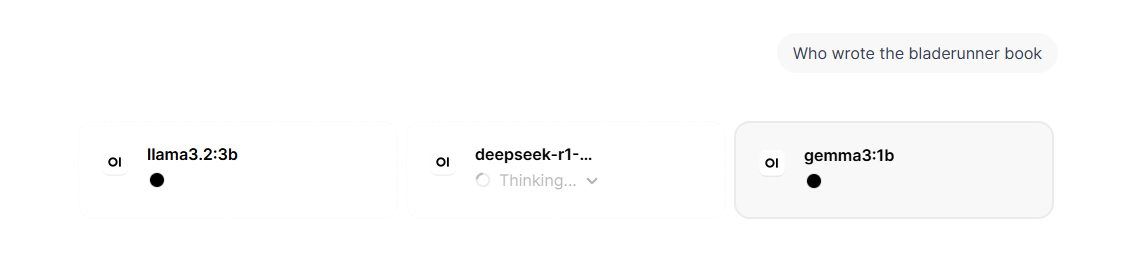
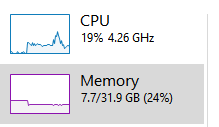
When testing models side by side in Open WebUI, each selected model request is sent independently to the backend (such as Ollama). If you use two models from Ollama in parallel, both models will typically be loaded into memory (or kept warm via caching), meaning RAM usage increases for each active model.
However, compute resources are not truly “shared” in a collaborative sense – each model runs its own inference process. Execution is generally time-sliced and queued by the runtime, so requests are handled sequentially per model instance, while the system scheduler distributes CPU/GPU usage across active processes.
In practice, this means no model gets strict priority; instead, whichever inference request is active at a given moment consumes available compute, and multiple models will compete for resources, leading to higher latency rather than true parallel efficiency unless you have significant hardware headroom.
🚀 Conclusion
LM Studio prioritises control and transparency, while Ollama prioritises efficiency and automation. Both are powerful tools, but they suit different workflows:
- LM Studio = manual, precise control
- Ollama = smart, adaptive runtime management
Choosing between them depends less on capability and more on how much control versus convenience you want in your local AI workflow.