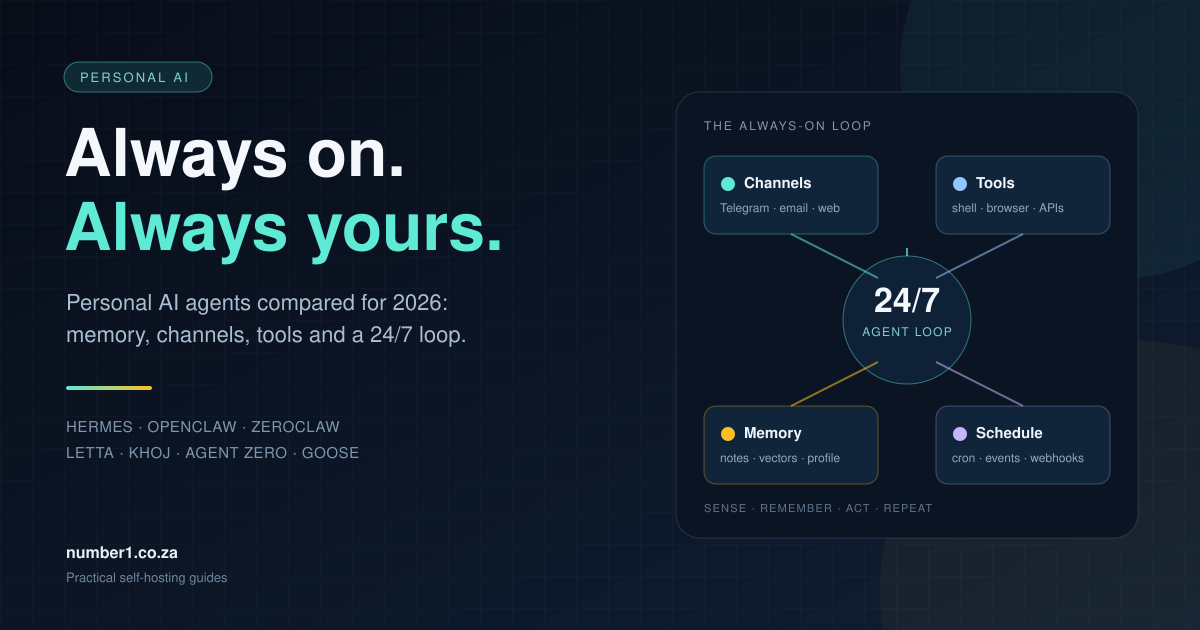
A chatbot answers when you open it. A personal AI agent keeps working after you close the tab: it watches a channel, decides what to do, calls a tool, writes down what it learned and wakes up again on a schedule. That loop is the difference between a clever demo and an assistant that runs part of your life.
Three names come up most often in that conversation: Hermes Agent, OpenClaw and ZeroClaw. They look comparable in a screenshot. They are not. Hermes is a general-purpose personal agent with a learning loop. OpenClaw is the largest ecosystem, with native apps and a Gateway that owns every chat channel. ZeroClaw is a small Rust runtime built to stay on and stay cheap.
OpenCode belongs in a different category. It is a coding harness for open-weight models and hosted providers: it runs a model against a repository with tools, agents and permissions. It has no personal memory, channel pairing or scheduler, so this guide treats it as a coding tool rather than a personal assistant.
This guide separates the jobs, then compares the tools that do them. It covers the three headline projects, the wider ecosystem around them, the memory layers that plug into them, and the hardware and security decisions that decide whether the thing survives contact with real life. Every project links to its home page, documentation and repository.
The comparison draws on each project’s documentation, licence and release notes. It focuses on fit, not benchmark scores. Screenshots come from each project’s documentation or repository and are credited in the captions.
TL;DR
| Job | Start with | Why |
|---|---|---|
| One personal assistant for life admin on a VPS | Hermes Agent | Channels, cron, curated memory, session search and a learning loop in one MIT-licensed package. |
| The largest ecosystem and native apps | OpenClaw | 20+ channels, macOS/iOS/Android apps, a Gateway, plugins and a large community. |
| The smallest always-on runtime | ZeroClaw | One Rust binary, 30+ channels, strong default security and a memory layer you can swap. |
| A coding harness for open-weight models | OpenCode | Repository tools, agents and permissions for coding work. It is not a personal assistant. |
| Memory-first custom agents | Letta | A git-backed memory filesystem, background consolidation and channels for a stateful agent you build. |
| A second brain over your documents | Khoj | Indexes notes and PDFs, answers with citations and emails scheduled research. |
| An agent with its own Linux computer | Agent Zero | A browser, desktop apps and a terminal inside a sandbox, with project-scoped memory. |
| A local toolkit for MCP and repeatable tasks | Goose | Desktop and CLI agent with recipes, subrecipes and a large MCP extension catalogue. |
| Scheduled coding work across repositories | OpenHands | Agent Canvas, an agent server and an automation server for repo tasks. |
| Durable memory for an agent you already run | Honcho or Mem0 | Memory as a service or library, with user modelling and semantic recall. |
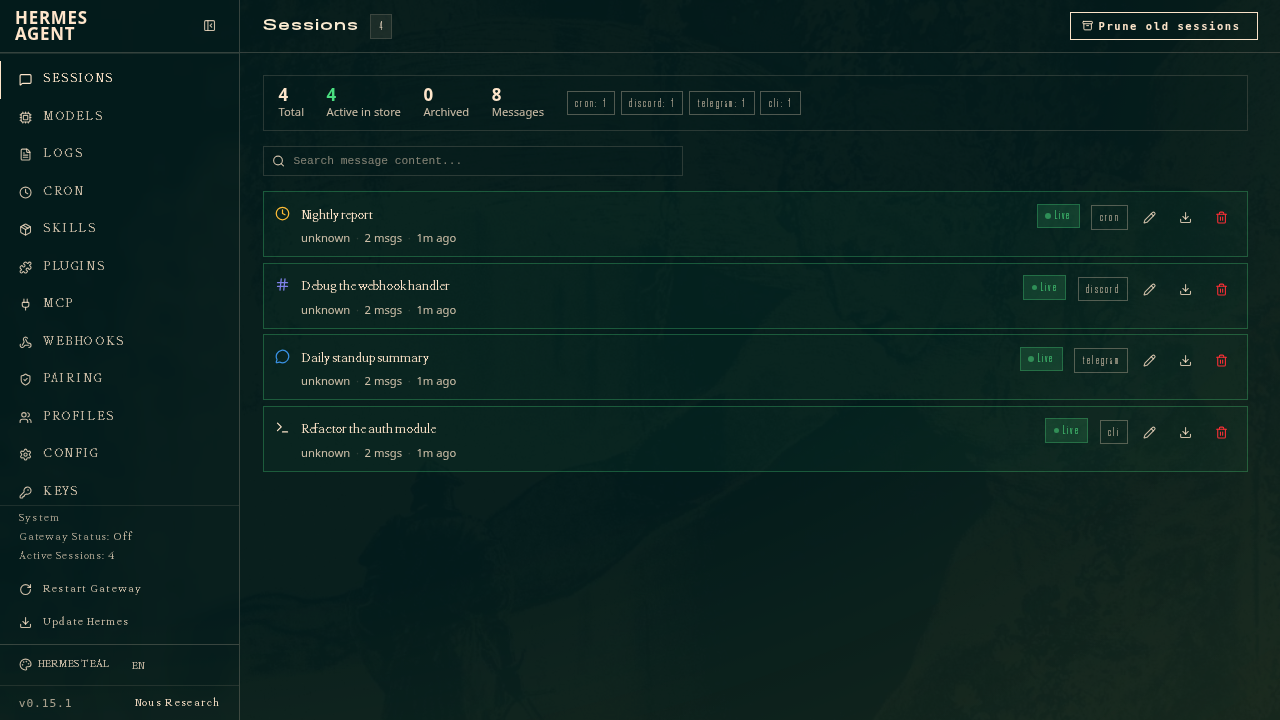
Hermes keeps CLI, Discord, Telegram and scheduled sessions in one dashboard. Screenshot: Hermes Agent.
What a personal agent is
Every always-on personal agent has the same five parts. Products differ in how much of each part they supply and how well the parts fit together.
| Part | What it does | What fails without it |
|---|---|---|
| Channel | Receives messages from Telegram, email, Slack, a web UI or a webhook. | The agent only works when you open a terminal. |
| Loop | Decides what to do, calls tools, checks the result and continues. | You get a single answer instead of completed work. |
| Tools | Shell, browser, HTTP, files, calendar, home automation, MCP servers. | The agent can talk about a task but cannot change anything. |
| Memory | Stores preferences, facts, past sessions and the state of a job. | You repeat yourself every morning. |
| Schedule | Runs work on cron, an event, a webhook or a heartbeat. | The agent waits for you instead of working while you sleep. |
That list explains why the three headline tools diverge. Hermes, OpenClaw and ZeroClaw supply all five parts. A coding harness such as OpenCode supplies the loop and the tools for a repository, and leaves channels, personal memory and a life-admin schedule to you.
The four categories
Agent runtimes own the loop and the always-on process. Hermes, OpenClaw, ZeroClaw and Letta sit here. They differ on language, memory model and how much they assume about your setup.
Coding harnesses and coding agents own a repository and a task. OpenCode is a harness for open-weight models; OpenHands and Goose are broader coding agents. They are excellent at code and weak at being a personal assistant, because they assume a project directory and a human at the keyboard.
Second brains own documents. Khoj indexes your notes and answers questions over them. It can schedule research, but its centre of gravity is knowledge, not action.
Memory layers own state. Honcho and Mem0 give another agent a place to remember. They are infrastructure, not assistants.
The category mistake is expensive. A coding agent with a cron job is still a coding agent: it has no channel pairing, no personal profile, no inbox and no reason to remember your sister’s birthday. A personal agent with a code tool is a personal agent that can also fix a bug. Start with the job, then pick the category.
Hermes Agent: the all-round personal agent
Hermes Agent is the project from Nous Research that turned the “agent that grows with you” idea into a full runtime. It runs on a $5 VPS, a laptop, a GPU server or serverless infrastructure. A single gateway process connects it to the messaging apps you already use, and a cron scheduler lets it work while you sleep.
Its defining feature is the learning loop. Hermes writes skills from experience, improves them during use, nudges itself to save durable facts and searches its own past sessions. The memory is deliberately small and readable: MEMORY.md holds about 2,200 characters of environment facts and lessons, and USER.md holds about 1,375 characters of preferences and profile. The agent manages both through a memory tool. A full-text search over SQLite covers everything that does not fit.
That design has a clear trade-off. The agent always has the important facts in context, and you can read every one of them in a text editor. The limit forces curation. When memory fills, Hermes makes room by consolidating or removing entries instead of silently dropping them.
What you get
- Channels: Telegram, Discord, Slack, WhatsApp, Signal, email, Home Assistant and the CLI, all through one gateway. Voice memos are transcribed, and conversations continue across platforms.
- Automation: a built-in cron scheduler delivers results to any channel. Daily reports, nightly backups and weekly audits run in natural language.
- Tools: 40+ tools, MCP servers, a skills system and six terminal backends: local, Docker, SSH, Modal, Daytona and Vercel Sandbox.
- Delegation: isolated subagents for parallel work, plus Python scripts that call tools over RPC.
- Memory: curated files, FTS5 session search, a learning journey view and optional external providers such as Honcho, Mem0 and Supermemory.
- Security: command approval, DM pairing, container isolation and scanning of memory writes for injection and exfiltration patterns.
Pros and cons
| Pros | Cons |
|---|---|
| Complete package: channels, cron, memory, skills and subagents in one install. | The Python stack is heavier than a single binary and needs more disk and RAM. |
| The strongest learning loop in this group: skills improve with use. | Memory has hard character limits, so it needs curation and a model that calls tools reliably. |
| Plain-text memory you can read, back up and edit. | The release cadence is fast, and configuration options change between minor versions. |
| Runs on a cheap VPS and talks to you from Telegram or Signal. | Small local models often claim to save memory without calling the tool; use a stronger model for setup. |
| MIT-licensed with a large community and clear documentation. | The breadth of features makes the first configuration longer than ZeroClaw’s. |
Best for: one agent that handles life admin, research, reminders, home automation and light coding work, running on a small VPS and reachable from your phone.
Watch out: Hermes is a personal agent, not a multi-tenant platform. Give each person their own profile or home directory. Two processes sharing one Hermes home will compound each other’s memory writes.
curl -fsSL https://hermes-agent.nousresearch.com/install.sh | bash
hermes setup
hermes gateway setup
hermes gateway startOpenClaw: the largest personal-agent ecosystem
OpenClaw, formerly Clawdbot and Moltbot, is the project that made the “personal agent in your chat apps” idea mainstream. One Gateway process owns every messaging surface: WhatsApp, Telegram, Slack, Discord, Signal, iMessage, Teams, Google Chat and more. Native apps for macOS, iOS, Android, Windows and Linux connect as clients or nodes, and the Control UI gives you a browser dashboard for chat, activity, nodes and configuration.
Its memory model is closer to a working notebook than a database. USER.md holds stable preferences, MEMORY.md holds durable facts, and memory/YYYY-MM-DD.md files hold daily notes. The agent searches them with memory_search and reads them with memory_get. A background “dreaming” process scores and promotes useful notes into long-term memory. The built-in engine uses SQLite; PostgreSQL, LanceDB and Honcho are options.
OpenClaw also has a large plugin and skill ecosystem. ClawHub distributes skills, the plugin SDK covers channels and tools, and the project supports a shared “multiplayer” setup where several people use one Gateway with separate agents and permissions.
Pros: the largest community, 20+ channels, polished native apps, a strong memory model and a plugin ecosystem. Cons: a Node.js daemon with a large surface area, a fast-moving codebase and a security model that needs attention before you expose it. Treat every inbound message as untrusted and pair unknown senders by default.
Best for: a household or small team that wants one assistant across many chat apps, with native mobile apps and a big plugin catalogue.
curl -fsSL https://openclaw.ai/install.sh | bash
openclaw onboard --install-daemon
openclaw gateway status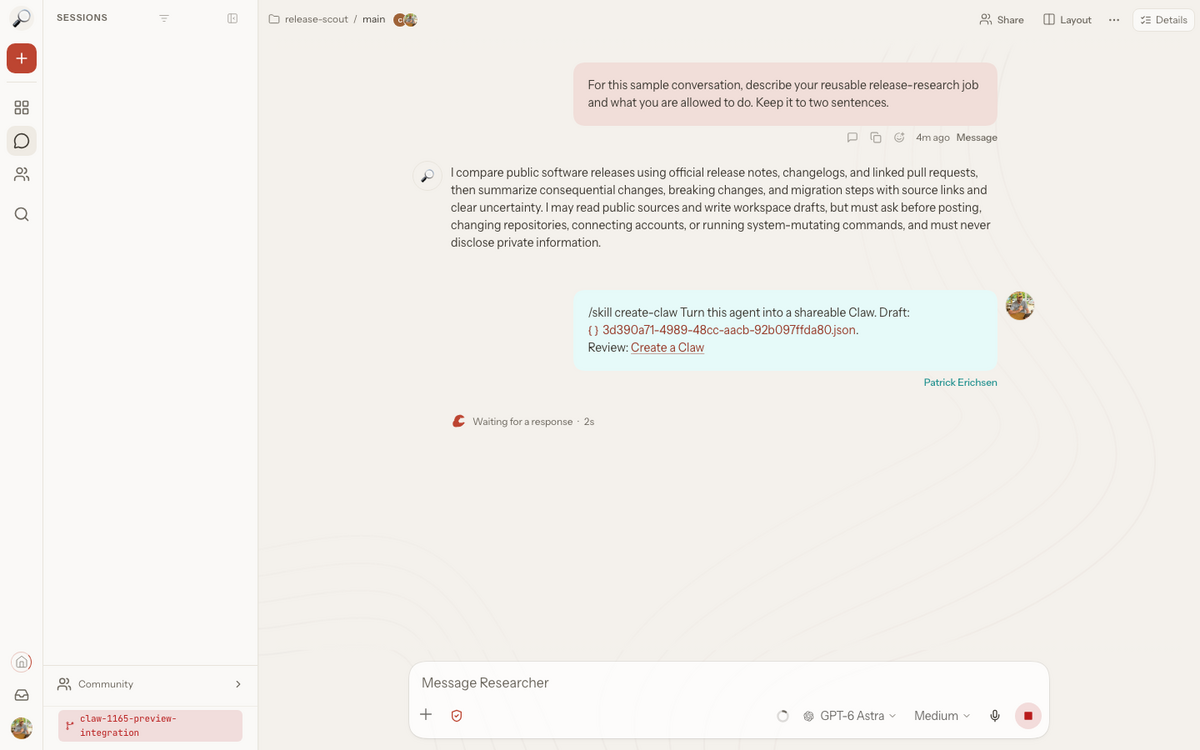
OpenClaw’s Control UI keeps conversations, agents and sessions in one browser view. Screenshot: OpenClaw.
ZeroClaw: the small always-on runtime
ZeroClaw takes the opposite approach to Hermes. It is one Rust binary with no Node, JVM or Python runtime to install. The core starts in milliseconds and uses less memory than a browser tab. It runs on x86 and ARM, down to a Raspberry Pi, and it can drive hardware over GPIO, I2C, SPI and USB.
The small footprint hides a broad feature set. ZeroClaw connects to 70+ model providers, reaches 30+ channels and runs the same agent loop behind every one of them. It supports Telegram, Discord, WhatsApp, Slack, Signal, iMessage, email, Matrix, Mattermost, IRC, Bluesky, Reddit, Nostr, DingTalk, Lark, Line, QQ, WeChat Work, Notion and webhooks. Local models work through Ollama, LM Studio, llama.cpp or vLLM.
Its memory is backend-neutral. SQLite is the default, with Lucid, PostgreSQL, Qdrant and Markdown as alternatives. Memory is scoped to an agent, supports hybrid retrieval and runs through a consolidation layer rather than a single prompt file. You can disable persistence entirely with none.
Security is the headline
ZeroClaw starts in supervised autonomy: medium-risk actions need approval and high-risk actions are blocked. It uses OS-level sandboxes (Landlock, Bubblewrap, Seatbelt or Docker), command allowlists and workspace scoping. Optional HMAC tool receipts stamp every successful tool call, so a run the model claims but never made produces a missing or invalid receipt. YOLO mode exists for trusted development boxes and stays opt-in.
That makes ZeroClaw the easiest of the three to justify on a machine that also holds real credentials. The trade-off is maturity: the project is on the v0.8 line, and the documentation and dashboard still feel younger than Hermes or OpenClaw.
What you get
- Footprint: one native binary, a cold start around 12 ms on Apple Silicon and support for Raspberry Pi-class hardware.
- Channels: 30+ adapters, all feeding one agent loop, with pairing and allowlists.
- Memory: SQLite, Lucid, PostgreSQL, Qdrant or Markdown, with hybrid retrieval and agent scoping.
- Automation: cron, webhooks, MQTT and a Standard Operating Procedure engine with approval gates and resumable runs.
- Tools: shell, browser, HTTP, hardware peripherals and custom MCP servers.
- Operations: a gateway and web dashboard for chat, memory, config, cron and tool inspection; systemd, launchd and Windows service install.
Pros and cons
| Pros | Cons |
|---|---|
| The smallest reliable always-on footprint in this group. | v0.8: younger, with rougher edges in docs and UI. |
| Security-first defaults: supervised autonomy, sandboxes, allowlists and tool receipts. | The memory model is powerful but less approachable than Hermes’ two Markdown files. |
| Runs on a Raspberry Pi or a cheap VPS without a runtime stack. | The channel and provider list is broad, and quality varies by adapter. |
| Backend-neutral memory avoids locking you into one store. | Fewer tutorials and community answers than OpenClaw or Hermes. |
| Hardware support makes it useful beyond chat. | The similar name to OpenClaw causes confusion; use the official repository. |
Best for: an always-on assistant on a small box, a homelab, a Raspberry Pi or a machine that needs a tight security boundary.
Watch out: ZeroClaw is an independent Rust project in the OpenClaw family, not the same codebase. Copycat repositories and domains exist. Install from zeroclaw-labs/zeroclaw or zeroclaw.com only.
curl -fsSL https://zeroclaw.com/install.sh | bash
zeroclaw quickstart
zeroclaw service install
zeroclaw service start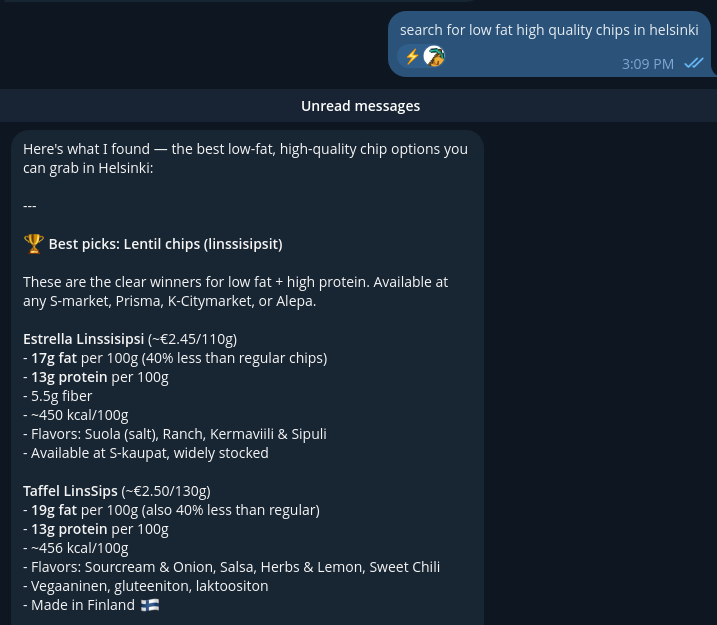
ZeroClaw answers in the channel you already use and shows the tool result behind the answer. Screenshot: ZeroClaw.
Where OpenCode fits: a coding harness, not a personal agent
OpenCode is a coding harness for open-weight models and hosted providers. It runs a model against a repository with shell, file, search, LSP and MCP tools, then lets you define agents and permissions around that work. It started in the terminal and now runs as a terminal UI, a desktop app, a web interface and a headless server.
Its centre of gravity is code. The built-in build agent works on the repository, the plan agent explores without editing, and subagents handle reviews and searches in fresh contexts. You can point it at a local model or a hosted provider, and the same harness works across both. That makes it a strong choice for coding with open-weight models.
It is not a personal assistant. OpenCode has sessions, project rules and skills, but no personal memory profile, no channel pairing and no scheduler. You can put a cron job or a chat interface around it, and people do, but the result is a coding harness with extra plumbing. Use Hermes, OpenClaw or ZeroClaw when the job is life admin, and use OpenCode when the job is code.
Best for: a developer who wants a model-agnostic coding harness for open-weight models, or a team that wants a scriptable coding agent behind CI.
Watch out: a coding harness with shell access is a serious permission boundary. Use the plan agent for exploration, keep the build agent’s shell rules tight, and run it in a container or a dedicated user account when it works unattended.
curl -fsSL https://opencode.ai/v2/install | bash
opencode
opencode run "summarise the failing tests and propose a fix"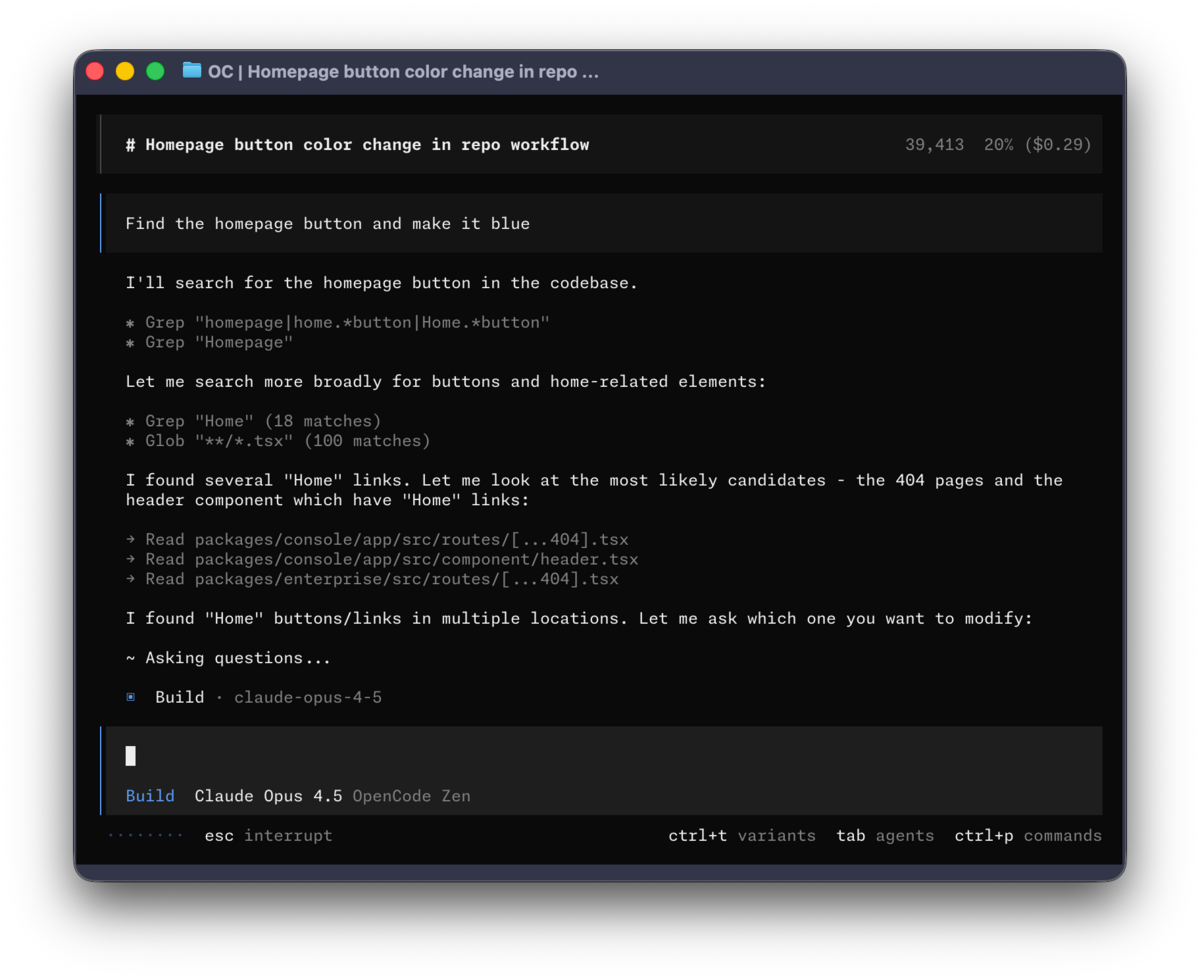
OpenCode runs the build agent against a repository and shows the tool calls in the terminal. Screenshot: OpenCode.
The rest of the ecosystem
The three headline tools are not the whole market. Five more projects cover jobs they leave open: memory-first agents, a document second brain, a full computer workspace, a local MCP toolkit and coding automation.
Letta: memory as the centre of the agent
Letta, formerly MemGPT, is the project that treats memory as the main design problem. Its current agent harness is Letta Code. Agents keep a git-backed MemFS memory filesystem that they can inspect, edit and commit. Memory is shared across conversations and improves as the agent learns durable facts about you and its work.
You initialise memory with /init, teach it with /remember, and let background “dreaming” subagents review recent conversations and consolidate lessons. The agent can reorganise its own memory hierarchy, with a backup before large cleanups. Channels for Slack, Telegram, Discord, WhatsApp and Signal run against a local letta server, and schedules and subagents are built in.
Pros: the most serious memory design in this group, a clean self-hosted app server, channels and schedules, and a strong research lineage. Cons: it is a platform for building stateful agents, not a turnkey life assistant. The repository split between letta and letta-code confuses newcomers, and the old V1 API server is retired.
Best for: a developer or team that wants to build a custom agent with durable, inspectable memory and does not mind assembling the loop.
npm install -g @letta-ai/letta-code
letta
letta server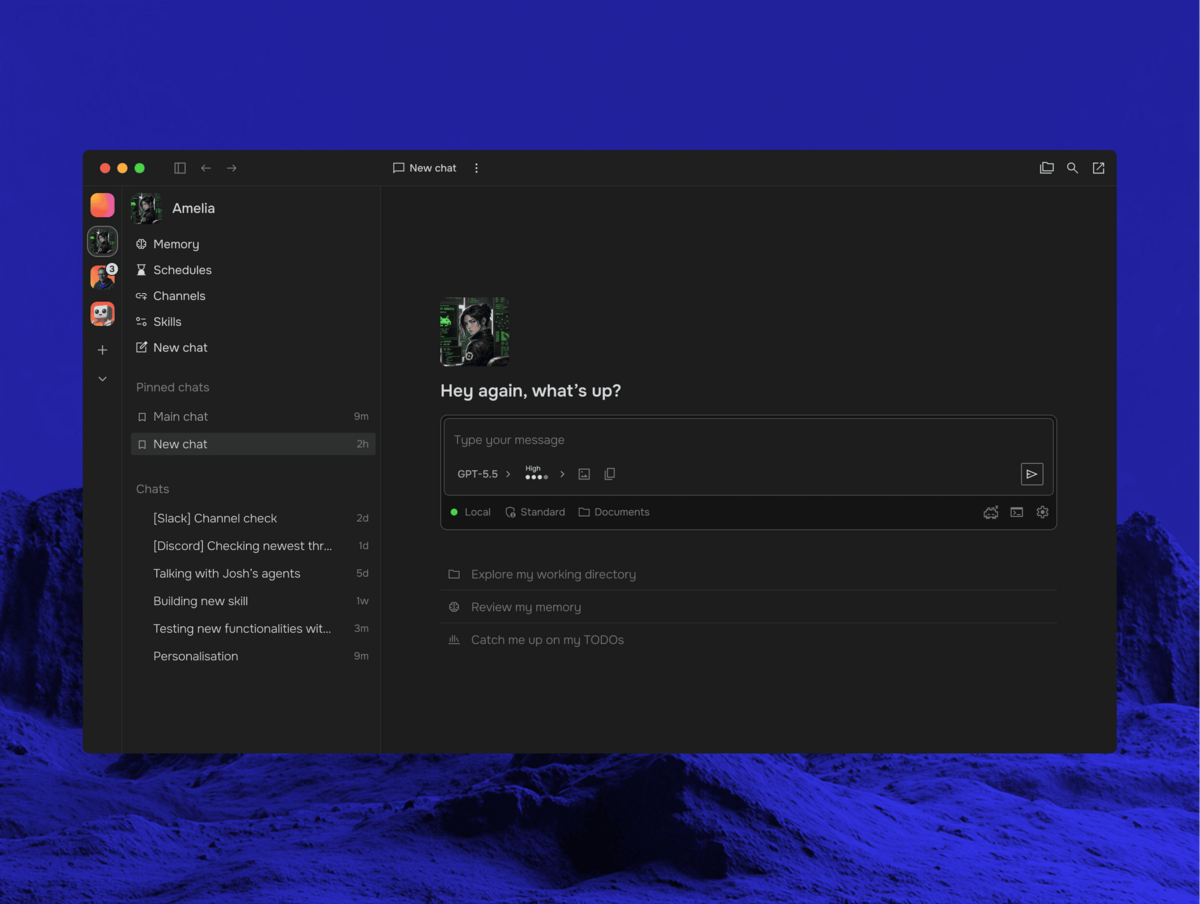
Letta puts memory, schedules, channels and skills beside the conversation. Screenshot: Letta documentation.
Khoj: the second brain that answers questions
Khoj is a self-hostable AI second brain. It indexes your documents, notes and web sources, then answers questions with citations. It reads PDFs, Markdown, org-mode, Word, Notion and more, and it reaches you through a web app, Obsidian, Emacs, a desktop app, a phone or WhatsApp.
Khoj adds custom agents with their own knowledge, persona and tools. Its automations run a query on a schedule and email you the result, which makes it useful for a weekly research digest or a monitoring brief. It supports local and online models, including Ollama, and it runs from Docker Compose or pip.
Pros: excellent document recall, citations, a gentle learning curve and useful scheduled research. Cons: its memory is your indexed knowledge plus chat history, not a self-editing personal profile. It is a knowledge assistant first, an actor second. The 2.0 line is still in beta, and the licence is AGPL-3.0, which matters if you modify and host it as a service.
Best for: research, study, writing and anyone with a large notes vault who wants answers with sources.
Set KHOJ_ADMIN_PASSWORD and KHOJ_DJANGO_SECRET_KEY in the compose file before you start.
mkdir -p ~/.khoj && cd ~/.khoj
wget https://raw.githubusercontent.com/khoj-ai/khoj/master/docker-compose.yml
docker compose up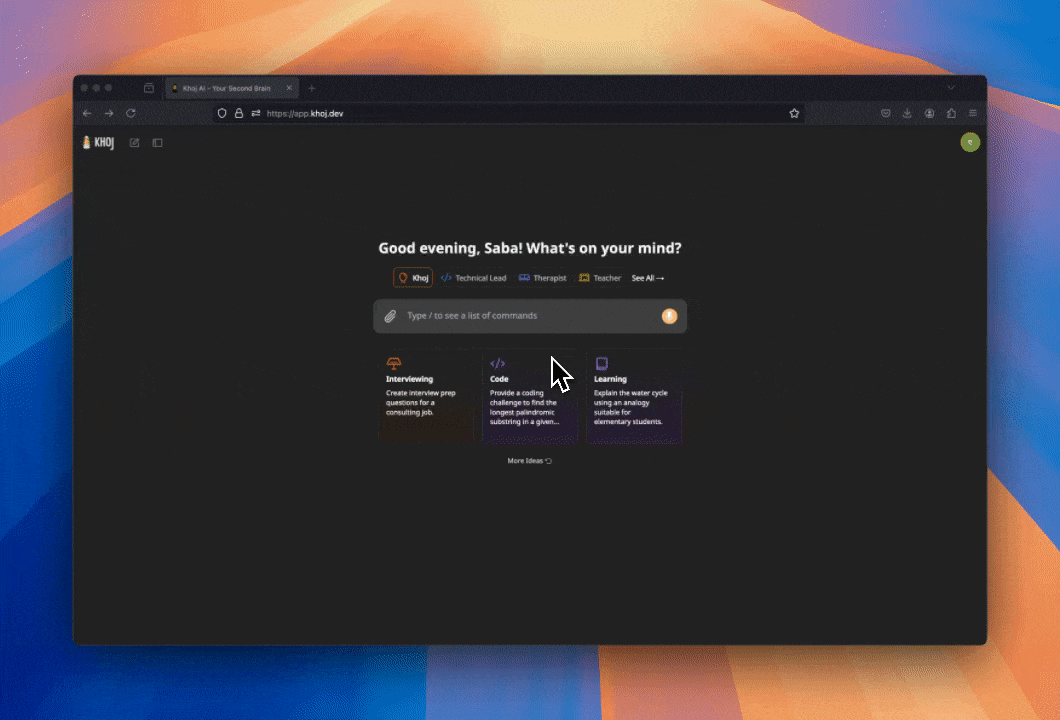
Khoj starts from your documents and offers agents for research, code and learning. Screenshot: Khoj.
Agent Zero: give the agent a computer
Agent Zero runs a full Linux workspace inside a Docker container. The agent gets a browser, a terminal, a file manager and desktop applications such as LibreOffice and Blender. You can watch it work, take over the mouse and keyboard, or annotate a web page and ask for changes.
Projects are the organising unit. Each project carries its own instructions, files, memory, secrets and model settings, so a client job does not bleed into a research task. The memory dashboard stores conversation memory, imported knowledge, learning notes and project memory as vector embeddings you can search, edit and delete.
Pros: the strongest computer-use experience in this group, excellent for documents, browsers and design work, and good project isolation. Cons: heavier than a chat-first agent, with a Linux desktop and Docker in the stack. It is not channel-first, and the attack surface is larger because the agent can drive a real desktop.
Best for: tasks that need a real computer: filling in web forms, editing spreadsheets, reviewing a UI, processing documents or driving a desktop app.
curl -fsSL https://bash.agent-zero.ai | bash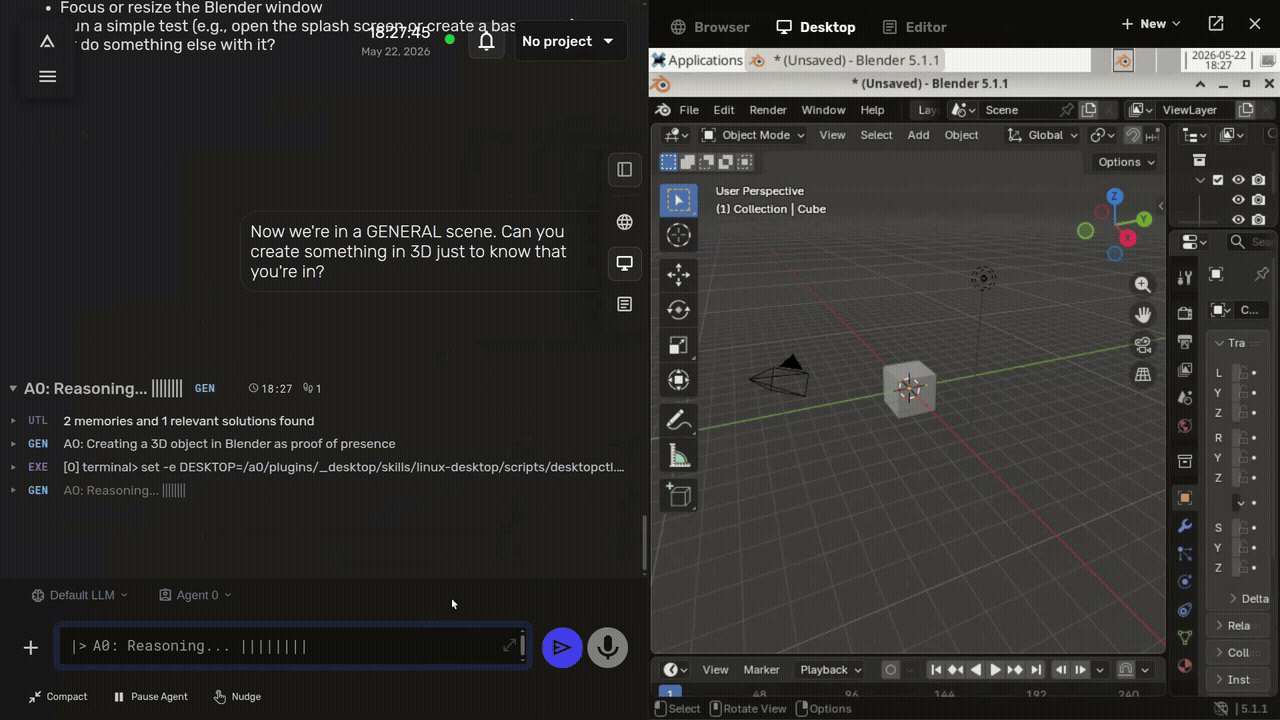
Agent Zero works inside a Linux desktop and lets you watch or take over. Screenshot: Agent Zero.
Goose: the local MCP toolkit
Goose is an open-source, extensible agent that runs on your machine, in the desktop app or the terminal. It connects to external tools through MCP, packages repeatable workflows as recipes, and supports subrecipes that run in parallel. It is a strong choice when the job is “use my local tools” rather than “live in my chat apps”.
Automation: goose run executes headless tasks, instruction files and recipes, with JSON output for CI and scripts.
Goose moved from Block to the Agentic AI Foundation in 2026. The code now lives at aaif-goose/goose and the documentation at goose-docs.ai. The old block.github.io/goose site redirects, so old bookmarks still work.
Pros: a polished desktop and CLI, a large MCP extension catalogue, recipes for repeatable work and an Apache 2.0 licence. Cons: sessions and context files instead of a personal memory profile, no channel pairing and no built-in scheduler. It is a local power tool, not an always-on assistant.
Best for: developers and technical users who want a local agent wired into MCP servers, files and scripts, with reproducible recipes.
curl -fsSL https://github.com/aaif-goose/goose/releases/download/stable/download_cli.sh | bash
goose
Links: Home and docs · GitHub
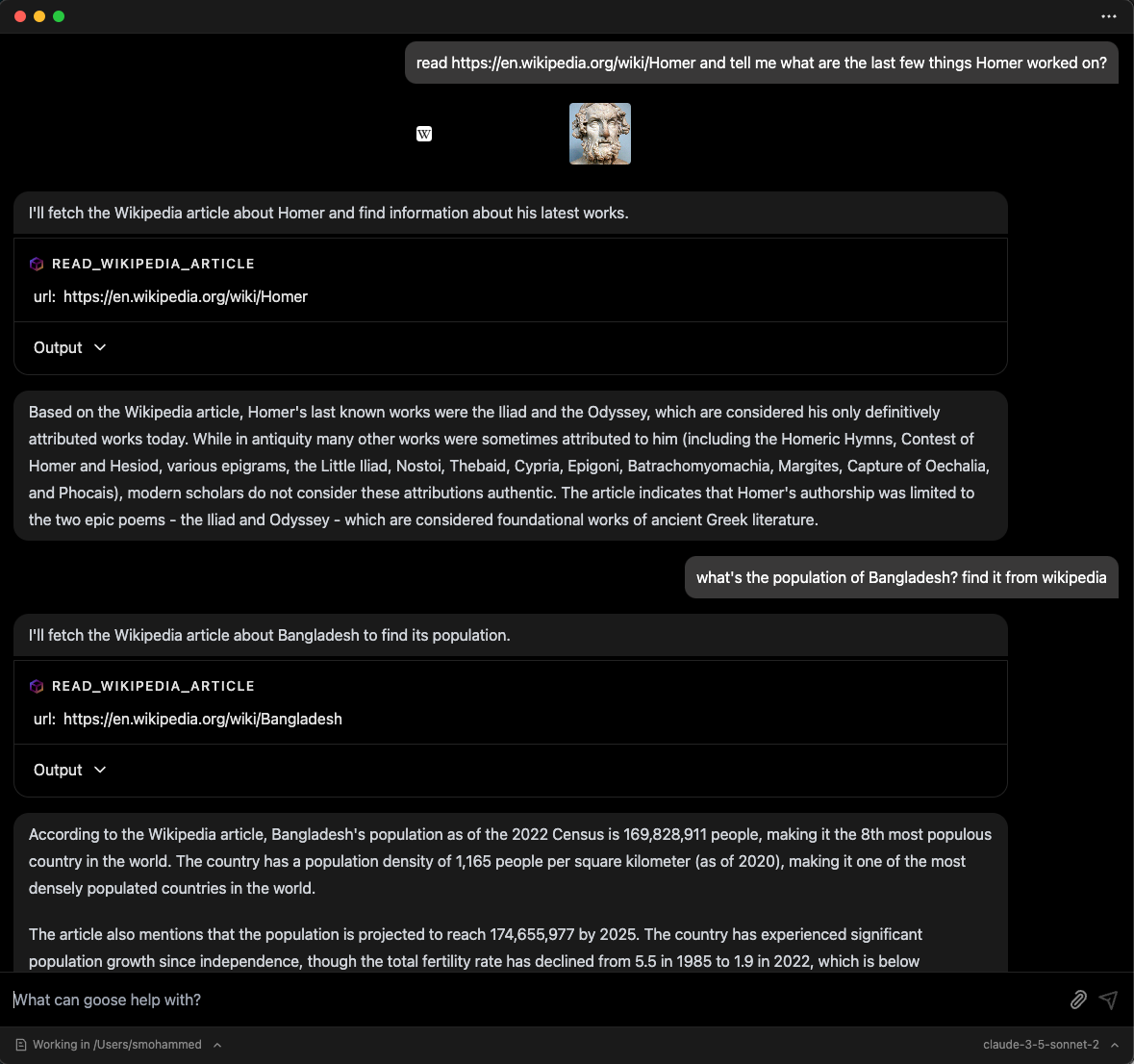
Goose runs an MCP tool call and keeps the result beside the answer. Screenshot: Goose documentation.
OpenHands: coding automation at platform scale
OpenHands is an AI-driven development platform. Its current shape is a browser client called Agent Canvas, an Agent Server that runs conversations and workspaces, a Python Software Agent SDK and an Automation Server for scheduled and event-driven work. The old openhands serve local GUI is deprecated, so new installs should start with Agent Canvas.
That automation server is the interesting part for this guide. You can schedule a repository task, run it in a sandbox and review the result later. It is not a personal assistant, but it is a strong always-on worker for code maintenance, issue triage, dependency updates and repetitive reviews.
Pros: a real automation layer, sandboxed execution, a strong SDK and a mature coding-agent heritage. Cons: coding-only, with a larger stack and a cloud/enterprise split. The documentation still carries legacy paths, so follow the Agent Canvas setup.
Best for: teams that want scheduled or event-driven coding work across repositories, with a reviewable run history.
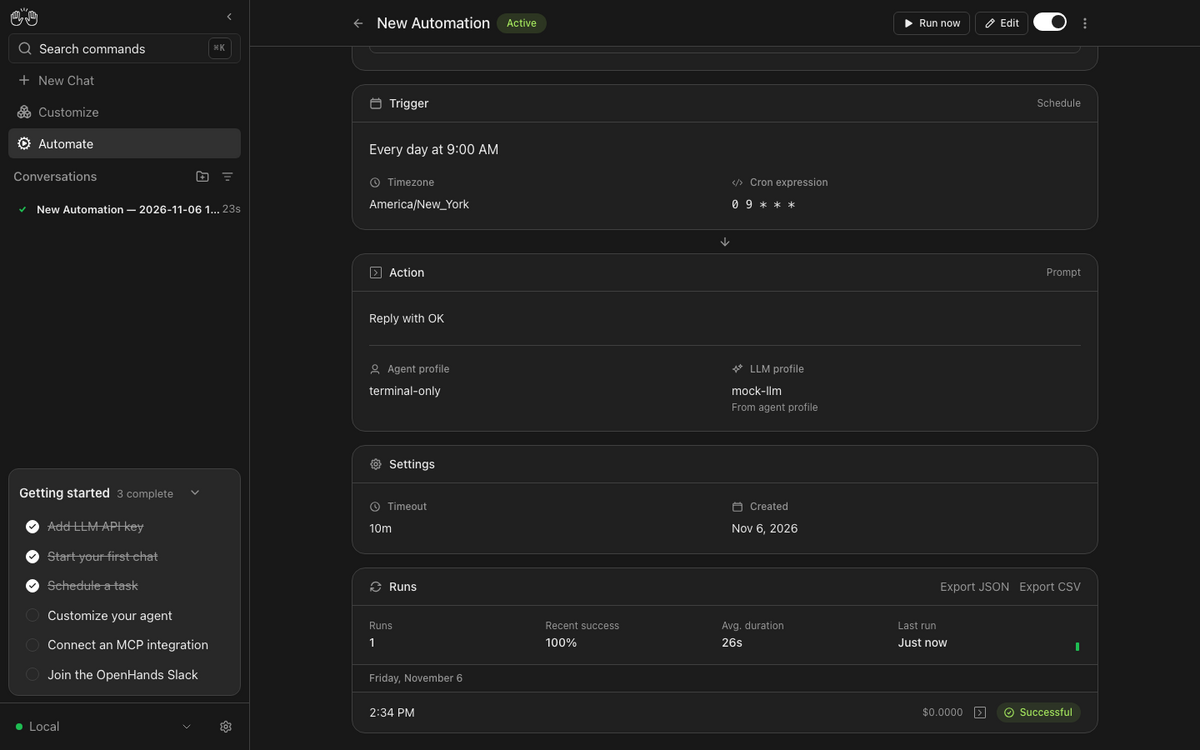
OpenHands schedules an agent run, records the result and keeps the run history. Screenshot: OpenHands.
Honcho and Mem0: memory for the agent you already have
If you already have a loop and a channel, the missing piece is often memory. Two projects dominate that layer.
Honcho is an open-source memory library and managed service. It models workspaces, peers, sessions and messages, then runs reasoning over the conversation to build representations of each person. That gives an agent a changing model of you rather than a pile of embeddings. Hermes and OpenClaw both ship Honcho integrations. It is AGPL-3.0 and self-hostable.
Mem0 is a drop-in memory layer with a clean add/search API, graph memory and a self-hosted library or Docker stack. It has integrations for OpenCode, OpenClaw, Claude Code, LangChain, CrewAI and others. It is Apache 2.0 and designed for production. Supermemory is another MIT-licensed, local-first memory engine worth a look if you want an API rather than a full agent.
Use Honcho when you want a reasoning layer that models users and relationships over time. Use Mem0 when you want a familiar memory API with broad framework support. Skip both when a plain Markdown file or a SQLite table already does the job; every extra service adds a failure mode.
Links: Honcho home · Honcho docs · Honcho GitHub · Mem0 home · Mem0 docs · Mem0 GitHub
Comparison table
| Tool | Type | Licence | Always-on | Channels | Memory | Best fit |
|---|---|---|---|---|---|---|
| Hermes Agent | Personal agent runtime | MIT | Yes | Telegram, Discord, Slack, WhatsApp, Signal, email, Home Assistant, CLI | Curated Markdown files, FTS5 session search, optional Honcho/Mem0 | One all-round assistant on a VPS |
| OpenClaw | Personal agent runtime | MIT | Yes | 20+ and native apps | Markdown files, search, dreaming, optional Postgres/LanceDB/Honcho | Largest ecosystem and multi-user |
| ZeroClaw | Personal agent runtime | MIT or Apache-2.0 | Yes | 30+ | SQLite, Lucid, PostgreSQL, Qdrant or Markdown | Small, secure always-on box |
| OpenCode | Coding harness | MIT | Headless server and scheduled runs | None native | Sessions, project rules, skills | Coding with open-weight models |
| Letta | Stateful agent platform | Apache-2.0 | Yes, with the app server | Slack, Telegram, Discord, WhatsApp, Signal | Git-backed MemFS, dreaming, shared across conversations | Memory-first custom agents |
| Khoj | Second brain | AGPL-3.0 | Scheduled research | Web, WhatsApp, Obsidian, Emacs, desktop, phone | Indexed documents and chat history | Research over your own documents |
| Agent Zero | Computer-use agent | MIT | Yes, as a server | Web UI | Vector memory, knowledge base, project isolation | Desktop, browser and document tasks |
| Goose | Local agent toolkit | Apache-2.0 | No native scheduler | None native | Sessions and context files | MCP tools and repeatable recipes |
| OpenHands | Coding platform | MIT (main repo) | Yes, with Automation Server | None native | Conversations and workspaces | Scheduled coding across repositories |
| Honcho | Memory layer | AGPL-3.0 | Not an agent | Not an agent | User modelling and reasoned representations | Add memory to an existing agent |
| Mem0 | Memory layer | Apache-2.0 | Not an agent | Not an agent | Add/search API, graph memory | Drop-in memory for apps and agents |
How to choose
Start with the constraint that hurts today. The longest feature list rarely wins.
You want one assistant for life admin
Choose Hermes Agent. It gives you the channel, the loop, the memory and the schedule in one place, and its curated memory is easy to read and back up. Run it on a 2–4 GB VPS and talk to it from Telegram or Signal.
You have a Raspberry Pi or a 1 GB VPS
Choose ZeroClaw. A single Rust binary with no runtime stack fits where a Node or Python agent struggles. Its supervised defaults and sandboxes matter on a small box that also holds credentials.
You want the largest ecosystem and native apps
Choose OpenClaw. The mobile apps, plugin catalogue and multiplayer mode are unmatched. Budget more time for security: pairing, sandboxing and a careful review of every plugin.
You want to build a custom stateful agent
Choose Letta. MemFS and dreaming give you a memory model worth building on, and the app server plus channels cover the plumbing. Expect to write the loop and the product around it.
You want a second brain, not a butler
Choose Khoj. It reads your documents, cites its sources and emails scheduled research. Pair it with Hermes or ZeroClaw when you want the research to turn into action.
You want the agent to use a real computer
Choose Agent Zero. It handles browsers, spreadsheets, documents and desktop apps in a sandbox. Give it its own container and a separate account, and keep sensitive files out of the workspace.
You want a coding harness
Choose OpenCode when you want a coding harness for open-weight models. Choose OpenHands when the work should run on a schedule or an event. Choose Goose when you want a local agent wired into MCP tools and repeatable recipes.
You already have an agent and need memory
Add Honcho for user modelling and reasoned recall, or Mem0 for a broad, production-friendly memory API. Add either only when the built-in memory becomes the bottleneck.
What to do with one
The useful question is not “which agent is smartest”. It is “which recurring job can I hand over this week”. These are the jobs people keep.
| Job | What you ask | Tools that fit |
|---|---|---|
| Morning brief | “Check my calendar, inbox, weather and three news feeds. Send a five-bullet brief at 07:00.” | Hermes, ZeroClaw, OpenClaw |
| Inbox and admin | “Draft replies to the five oldest unanswered emails. Ask before sending anything.” | Hermes, OpenClaw, Letta |
| Research and writing | “Summarise these PDFs with page citations and list the disagreements between them.” | Khoj, Letta, Goose |
| Code maintenance | “Run the failing tests, propose a fix and open a draft pull request.” | OpenCode (coding harness), OpenHands, Goose |
| Home automation | “When the outside temperature drops below 12 °C, check the windows and message me.” | Hermes, ZeroClaw |
| Personal CRM | “Remember that Sarah prefers Signal and is travelling next week. Remind me to follow up on Monday.” | Honcho, Letta, Hermes |
| Family or team assistant | “Keep a shared shopping list. Let everyone add items, but ask me before deleting one.” | OpenClaw multiplayer, Letta channels |
| Business operations | “Reconcile this month’s invoices, chase the late ones and draft the summary for my accountant.” | Hermes, OpenClaw, Agent Zero |
| Learning | “Quiz me on these notes, then explain the parts I get wrong with simpler examples.” | Khoj, Goose |
| Health and fitness | “Log this workout, compare it with the last four weeks and suggest one change.” | Hermes, ZeroClaw |
Start with one job and one channel. A morning brief is a good first project: it exercises the scheduler, the calendar and email tools, the model and the delivery path without giving the agent permission to delete anything. Add a second job only when the first one runs for a week without surprises.
Hardware, cost and power
The agent is cheap. The model calls are the bill. A small VPS or a Raspberry Pi can run the loop; the cost that scales is the tokens you send to a hosted model.
| Setup | Hardware | Rough monthly cost | Fits |
|---|---|---|---|
| Small always-on agent | 1 GB VPS or Raspberry Pi 4/5 | $5–$10 plus model usage | ZeroClaw with a hosted model, one or two channels |
| All-round personal agent | 2–4 GB VPS, 2 vCPU | $10–$20 plus model usage | Hermes or OpenClaw with a hosted model, cron and a few tools |
| Local-model second brain | 16 GB RAM mini PC or a desktop with a 7B–14B model | Hardware cost plus electricity | Khoj, Letta, Agent Zero or Goose with Ollama |
| Serious local model | 24 GB+ GPU, or a 32 GB unified-memory machine | Hardware cost plus electricity | Local 14B–32B models for private, high-volume work |
| Coding automation | Laptop or CI runner | $0–$20 plus model usage | OpenCode, OpenHands, Goose |
A hosted model costs more per token than a local one, and it is faster to start. A local model costs nothing per token, and it needs RAM or VRAM, electricity and patience. The break-even depends on volume: a few hundred messages a day usually favours a hosted model; a constant stream of research or coding work can justify local hardware.
Always-on does not mean always busy. Idle agents wait on a channel or a timer and use almost nothing. The expensive part is a loop that keeps calling a model to check whether anything changed. Use events and cron instead of a tight polling loop.
Security and privacy
An agent with shell access has the same access as the user it runs as. Treat it as a remote employee with your credentials, not as a chatbot.
- Assume prompt injection. Every email, web page, issue comment and chat message is untrusted input. A page can tell the agent to ignore its instructions. Keep approvals on for shell, payments, sends and deletes.
- Use a separate identity. Run the agent as its own Unix user, in a container or a VM. Give it its own SSH key, its own API keys and its own workspace. Do not run it as your desktop user with your home directory mounted.
- Pair every channel. Hermes, ZeroClaw, OpenClaw and Letta support pairing or allowlists. Keep the gateway on localhost, a VPN or Tailscale. Never expose an unauthenticated dashboard to the public internet.
- Sandbox the tools. Use the OS sandbox the project provides: Landlock, Bubblewrap, Seatbelt or Docker for ZeroClaw; containers and command approval for Hermes and OpenClaw; Docker for Agent Zero and OpenHands.
- Keep secrets out of memory. Memory files are for preferences and facts, not API keys. Use a secret manager or environment files with tight permissions, and rotate anything the agent has seen.
- Review what it learns. Memory poisoning is real: an attacker who can write to memory can change future behaviour. Turn on write approval where the project offers it, and review new entries.
- Back up memory and state. Export the Markdown files, the SQLite database or the Postgres dump. Test a restore on a clean host. The memory is the part you cannot recreate.
- Check the supply chain. Skills and plugins execute code. Install from the official registry, pin versions and read the source of anything that touches credentials or the shell.
- Know where prompts go. A hosted model sees your prompts and tool results. Choose a provider with the retention terms you need, or run a local model for private material.
- Separate people. One agent per person or one profile per person. Shared memory between users leaks context and makes permissions meaningless.
The projects differ in how much they enforce. ZeroClaw starts supervised and blocks high-risk actions by default. Hermes asks for approval on commands and pairs unknown senders. OpenClaw pairs devices and supports sandboxing, while trusting the host more than ZeroClaw’s supervised defaults. Letta and OpenClaw both give you channels and multi-user features, which raises the stakes: a shared assistant needs per-user permissions, not one shared admin account.
A sensible starter stack
These four setups cover most people. Pick one, run it for a month, then add the next piece only when the first one proves useful.
Option A: the all-round personal assistant
- Host: 2 vCPU, 4 GB RAM, 40 GB disk VPS running Ubuntu 24.04. My guide to where long-running Docker Compose apps live on a VPS covers the directory layout.
- Agent: Hermes Agent with a hosted model, Telegram and Signal, cron for the morning brief and backups.
- Memory: the built-in
MEMORY.mdandUSER.md, plus a weekly export to your laptop. - Access: Tailscale or a VPN for the dashboard; the bot is the only public surface.
- Add later: Honcho if one profile is not enough, or Khoj if you want document research beside the assistant.
Option B: the small always-on box
- Host: Raspberry Pi 5 with 8 GB RAM, or a 1 GB VPS.
- Agent: ZeroClaw with a hosted model or a local model on another machine, Telegram and email, supervised autonomy and tool receipts.
- Memory: SQLite by default; move to PostgreSQL or Qdrant only when you need it.
- Access: the gateway on the LAN, reached through Tailscale. No public dashboard.
- Add later: a second agent for a different job, with its own memory directory.
Option C: the household or team assistant
- Host: a mini PC or a small server that stays on.
- Agent: OpenClaw with one Gateway, separate agents per person, pairing for every channel and sandboxing for tools.
- Memory: workspace Markdown files, one workspace per person; review the dreamed promotions weekly.
- Access: native apps and the Control UI over Tailscale; no public exposure.
- Add later: ClawHub skills for the household, installed one at a time.
Option D: the coding and research bench
- Coding: OpenCode as a harness for open-weight models on the laptop, with a plan agent for exploration and a build agent for changes.
- Automation: OpenHands Automation Server for scheduled repo tasks, or OpenCode in CI for pull-request reviews.
- Research: Khoj over your notes and PDFs, with a weekly email digest.
- Memory: project rules in
AGENTS.md; add Mem0 only if you need cross-project recall.
Keep one agent responsible for each job. Two agents writing the same memory or the same repository will drift, and you will not know which one to trust. The same discipline that applies to self-hosted deployment tools applies here: one control plane per workload.
My picks
Best overall personal agent: Hermes Agent. It covers the most ground with the least glue, and its memory is readable and portable.
Best lightweight runtime: ZeroClaw. It is the one to put on a Raspberry Pi, a tiny VPS or a machine where security defaults matter.
Best ecosystem: OpenClaw. Choose it when channels, native apps and community plugins matter more than a small footprint.
Best coding harness: OpenCode. It is focused, fast and scriptable, and it runs open-weight models against a repository without pretending to be a life assistant.
Best memory platform: Letta. It gives memory the central role and backs it with a git history you can inspect.
Best second brain: Khoj. It turns a folder of documents into answers with sources.
Best computer-use agent: Agent Zero. It gives the agent a real desktop and keeps projects isolated.
Best local toolkit: Goose. It is the most pleasant way to wire MCP tools into repeatable recipes.
Best coding automation: OpenHands. The Automation Server turns a coding agent into a scheduled worker.
Best memory add-on: Honcho for user modelling, Mem0 for a broad API. Start with what the agent already ships.
FAQ
What is OpenCode?
OpenCode is a coding harness for open-weight models and hosted providers. It runs a model against a repository with tools, agents and permissions. It has no personal memory, channel pairing or scheduler, so it is not a personal AI assistant. Use Hermes, OpenClaw or ZeroClaw for that job.
Can I run these on a Raspberry Pi?
ZeroClaw runs well on a Pi, including hardware access over GPIO. Hermes and OpenClaw can run on a Pi with a hosted model, though the Node or Python stack uses more memory. Khoj, Letta, Agent Zero and a local model need more RAM; a 16 GB mini PC is a better fit.
Do I need a GPU?
No, if you use a hosted model. A GPU or a large unified-memory machine helps when you want a local model for privacy or volume. A 7B–14B model needs roughly 8–16 GB of memory; a 32B model wants 24 GB or more.
Which one is most private?
Privacy depends on where the model runs, not on the agent’s logo. ZeroClaw, Hermes, OpenClaw, Khoj and Agent Zero can all run with a local model through Ollama or an OpenAI-compatible endpoint. Keep the agent, the model and the memory on hardware you control, and check what telemetry the project sends.
Can I use WhatsApp or Telegram?
Yes with Hermes, ZeroClaw, OpenClaw and Letta. OpenCode, Goose, OpenHands and Khoj do not provide personal channel pairing in the same way; Khoj has a WhatsApp client, but it is a knowledge assistant rather than a general agent loop.
How much does it cost to run?
A small VPS costs $5–$20 a month. Model usage is the variable: a light personal assistant can cost a few dollars a month, while a busy coding agent can cost much more. A local model removes the token bill and adds hardware and electricity costs.
Can I run more than one agent?
Yes. Give each agent its own profile, home directory or container, and its own memory store. Run one agent per job or per person. Shared memory between agents causes context leaks and makes debugging harder.
Is OpenClaw the same as Clawdbot or Moltbot?
Yes. The project was renamed twice: Clawdbot became Moltbot, then OpenClaw. Old tutorials and repositories may still use the earlier names. Use openclaw/openclaw and openclaw.ai.
Is ZeroClaw a fork of OpenClaw?
ZeroClaw is an independent Rust project in the same “Claw” family. It is not the same codebase, and the similar names cause confusion. Install from zeroclaw-labs/zeroclaw and check the official domain.
What should I try first?
Set up one agent with one channel and one scheduled job. A morning brief or a weekly research digest is enough to test the loop, the memory and the delivery path. Add tools and autonomy after that job runs reliably for a week.
Sources and further reading
- Hermes Agent: memory, cron, messaging and repository.
- OpenCode (coding harness): agents, server, skills and repository.
- ZeroClaw: memory backends, history management and repository.
- OpenClaw: memory, gateway architecture and repository.
- Letta: memory and dreaming, channels and repository.
- Khoj: automations, self-hosting and repository.
- Agent Zero: memory, projects and repository.
- Goose: installation, recipes and repository.
- OpenHands: introduction, Agent Canvas and repository.
- Honcho: documentation and repository. Mem0: documentation and repository.
- Background: my practical LLM coding workflow and why local open LLMs cannot run tools cover the model side of the same problem.
The best personal agent is the one you keep using after the novelty wears off. Pick the smallest tool that covers your first real job, give it a narrow permission boundary and one memory store, and let it earn the next job.