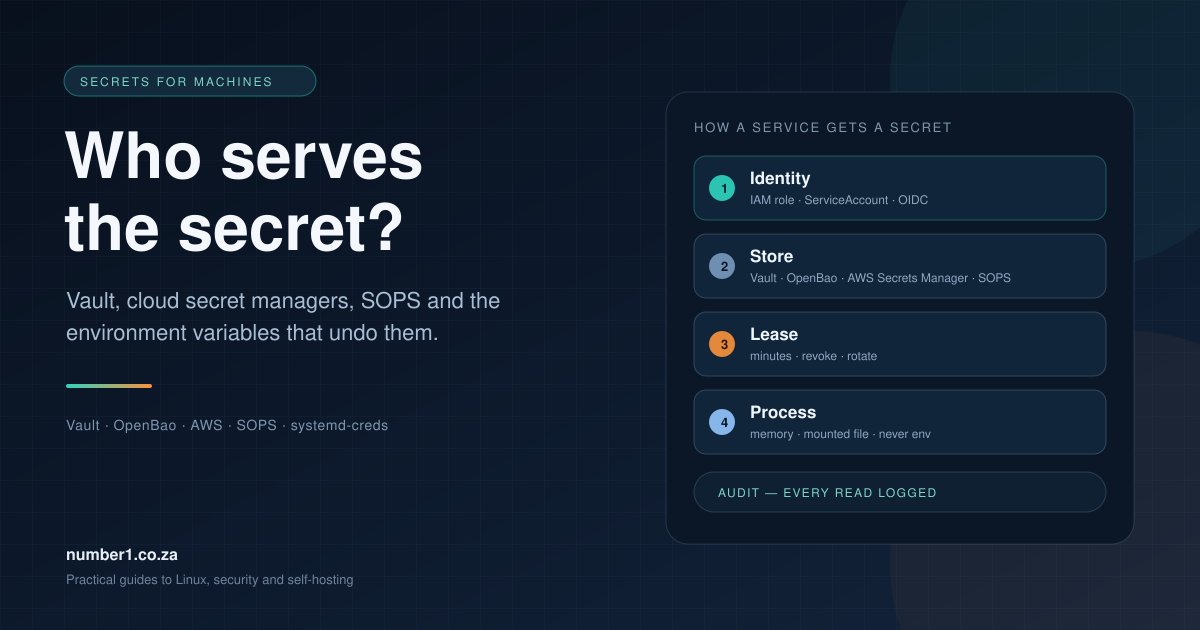
A server cannot click “reveal”. It boots at 3am, fetches what it needs and runs until something restarts it. Nobody is watching, so the credential has to arrive without a prompt, stay out of logs and expire before it becomes someone else’s problem.
That is a different job from the one a password manager does. Part one covered the tools a person touches: keyrings, password managers, credential helpers and browser stores. This part covers the tools that serve machines and the environment variables that quietly undo them.
The same two questions still sort the tools. Who holds the secret? Here, always the workload itself. Who unlocks it? An identity the platform already trusts: an IAM role, a Kubernetes service account, a TPM chip or a signing key held by an operator.
| Job | What good looks like | Typical tools |
|---|---|---|
| A workload’s own credential | Short-lived credentials, an audit trail, rotation, least privilege | Vault, OpenBao, AWS Secrets Manager, Bitwarden Secrets Manager |
| Secrets in a repository | Encrypted values, readable structure, reviewable diffs | SOPS with age or GPG, Sealed Secrets |
| Secrets in a process | Inherited at start, invisible on disk | Environment variables, systemd-creds, mounted files |
Each row is a different job with its own tools and no single product covers all three.
The short version
Machines need a store that can hand out credentials without a human, shorten their life and record who read them. Anything less is a spreadsheet with better marketing. Build the identity chain first, put the secret behind it and make it expire.
Part one covers the other half: the keyrings, password managers and browser stores that keep a person’s credentials in one place.
1. The store is not the hard part
Every product in this layer stores encrypted bytes. They differ in three things that matter more than the cipher: how a workload proves who it is, how long a credential lives and what record remains afterwards.
A static secret in a store with strong encryption is still a static secret. If the only thing standing between an attacker and your database is a value that never changes, the encryption bought you time, not safety. The products worth paying for are the ones that shorten the life of a credential and can tell you who read it.
The client is usually code you write. A Python service calls get_secret_value through boto3 and parses the JSON; a shell script runs vault kv get -field=password; a Go service uses the SDK. That wrapper is not a security control. It caches the value, retries a throttle and refreshes before the lease ends and it is also where secrets leak: a debug log of the response or an exception handler that dumps the payload. The security comes from the identity the process presents, which is why a wrapper cannot rescue a design with no workload identity.
2. The stores that serve machines
HashiCorp Vault and OpenBao
Vault is a server that stores secrets encrypted at rest and brokers access to them. Its distinguishing feature is dynamic secrets: it can create a database user or an AWS key pair on demand, attach a lease and revoke the credential automatically when the lease expires. It also offers transit encryption, a PKI engine and many authentication methods, from OIDC and LDAP to Kubernetes service accounts and AppRole.
OpenBao is the community fork, managed by the OpenSSF after HashiCorp moved Vault to the Business Source Licence in 2023. OpenBao keeps the MPL-2.0 licence and tracks Vault’s API closely, which makes it the drop-in choice for organisations that need an OSI-approved licence.
Who uses it: platform and security teams at organisations with many services, compliance obligations or a need to eliminate long-lived database passwords.
Where it fits: a central broker for machine credentials, with audit devices writing to a SIEM and identities coming from the platform rather than from static tokens.
Where it does not: a single laptop, a three-person startup with one VPS or a team with no one to run it. Vault is a stateful, highly available service with its own bootstrap problem: the unseal keys have to live somewhere and whoever holds them holds the estate. It is also the wrong place for human website logins; the UI is an operator console, not a password manager.
Related reading on this site: putting Keycloak in front of Vault and an earlier look at storing secrets for teams.
What a dynamic secret changes
With a static password, rotation is an event: someone changes the value, updates every consumer and hopes none was missed. With a lease, rotation is the normal path. A service asks for a credential, receives one that expires in an hour and the store revokes it when the lease ends. A leaked credential has a deadline.
That model costs something. Every consumer needs a way to authenticate to the store, which means workload identity, which means the platform has to support it. Where that identity exists, dynamic secrets remove a whole class of incident. Where it does not, the store becomes another place to keep a static password.
AWS Secrets Manager and Systems Manager Parameter Store
Secrets Manager stores key-value secrets, encrypts them with KMS, controls access through IAM, logs reads to CloudTrail and rotates credentials on a schedule by invoking a Lambda function. The AWS-managed rotation functions cover RDS, Redshift and DocumentDB; anything else needs a custom function. Cross-account access and multi-region replication are built in.
Parameter Store is the cheaper sibling. Standard parameters are free, SecureString values are encrypted with KMS and there is no native rotation. Advanced parameters add size and policies for a monthly fee.
Pricing is per secret and per call: $0.40 per secret per month and $0.05 per 10,000 API calls. Sixty secrets and a busy application still cost single-digit dollars, but storing a million short-lived tokens in Secrets Manager costs thousands, so keep ephemeral values in memory or in Vault.
Who uses it: teams already running on AWS, especially Lambda functions, ECS tasks and EC2 instances that can pick up an IAM role without any stored credential.
Where it fits: application configuration and third-party API keys for workloads inside AWS, where the workload identity already exists.
Where it does not: workloads outside AWS, where every read pays latency and egress and needs its own IAM plumbing; and large configuration blobs, since a secret value tops out at 64 KB. Model the per-call charge before you put a per-request credential there.
The bootstrap question is the one to answer first. The instance role, task role or OIDC trust is what makes the store worth using. Without it, the application needs a key to fetch a key and you have moved the problem.
Bitwarden Secrets Manager
Secrets Manager takes the Bitwarden model and aims it at pipelines. Secrets live in projects, machine accounts hold access tokens and a CLI or SDK injects values into a build. It is end-to-end encrypted like the password vault and can be self-hosted. For a small team already using Bitwarden, it closes the gap between the human vault and the deploy script without standing up Vault.
Who uses it: small teams that want one vendor for human and machine secrets, with a CLI that fits a shell script.
Where it fits: build pipelines, cron jobs and single-purpose hosts that need a handful of static values.
Where it does not: dynamic database credentials and deep cloud integration. It distributes static secrets well; it does not mint them.
SOPS with age or GPG
SOPS encrypts the values in a structured file and leaves the keys and comments readable. A YAML file in Git stays reviewable: you can see that db_password exists and changed, without seeing its value. It works with age, GPG, AWS KMS, GCP KMS, Azure Key Vault, Vault and OpenBao.
sops --encrypt --in-place secrets/production.enc.yaml
sops --decrypt secrets/production.enc.yaml | kubectl apply -f -
Who uses it: teams practising GitOps, platform engineers who want secrets in the same repository as the manifests and small teams who need encryption at rest without a server.
Where it fits: configuration that ships with the code and changes on the same schedule as the code.
Where it does not: run-time distribution and rotation. SOPS protects a file in a repository; it does not decide who may read a value at 3am and it cannot revoke a credential. Anyone who holds the private key and a copy of the repository can read every value in it, forever, including values you deleted.
Kubernetes Secrets, Sealed Secrets and External Secrets
A Kubernetes Secret is a base64-encoded object. Base64 is not encryption. Turn on encryption at rest for etcd, restrict RBAC tightly and prefer volume mounts over environment variables. For real management, add a layer:
- Sealed Secrets encrypts a Secret to a cluster-specific key, so the ciphertext can live in Git. It suits one cluster and gets awkward across many.
- External Secrets Operator syncs from Vault, AWS Secrets Manager or another provider into native Secret objects, so applications keep their usual mount points.
- Secrets Store CSI driver mounts secrets directly from the provider, so they never become etcd objects at all.
Where it does not: treating a bare Secret object as a secret manager. It has no rotation, no lease and no audit beyond the API server log.
systemd-creds
On a Linux host running systemd 250 or later, systemd-creds encrypts a credential to the machine and hands it to a service at start. Encryption uses AES-256-GCM with a key derived from the TPM2 chip, a root-only host secret or both. The service reads the value from a file in $CREDENTIALS_DIRECTORY, held in unswappable memory with mode 0400.
systemd-creds encrypt --name=db-password - /etc/credstore/db-password.cred

# then in the unit file:
# LoadCredentialEncrypted=db-password:/etc/credstore/db-password.cred
Who uses it: administrators of single Linux hosts who want a service to hold a secret without a plaintext unit file or an environment variable.
Where it does not: fleets and non-systemd systems. The ciphertext binds to one machine’s TPM or host key, so it does not travel.
3. The environment and why it leaks
Environment variables are the most common place a secret ends up and the least understood. They are simple, they work in every language and the twelve-factor guidance recommends them for configuration. That guidance is about configuration and it predates the scale at which a leaked environment became routine.
An environment variable is inherited by every child process. On Linux, any process running as the same user can read it from /proc/<pid>/environ. It appears in crash dumps, in docker inspect, in kubectl describe pod, in process listings with the right flags and in error trackers that capture scope. A secret in an environment variable is one careless log line away from a breach.
A .env file is a convenience wrapper: a file of KEY=value lines that a library loads into the environment at start-up. The file itself is only as protected as the filesystem. Commit it once and the secret lives in Git history forever, which is why cleanup requires rotating the credential rather than deleting the line.
| Placement | Visible to | Suitable for |
|---|---|---|
| Environment variable | Every child process, crash dumps, inspection tools | Non-sensitive configuration and short-lived container secrets you accept the risk for |
.env file, git-ignored |
Anything that can read the file | Local development defaults and dummy values |
| Mounted file on tmpfs | The process that mounts it | Passwords and keys in containers |
| Fetched at start-up from a store | The process and the store’s audit log | Production credentials that rotate |
Read the middle column as exposure: the more processes that can see the value, the weaker the placement.
Practical rules: commit a .env.example with the shape and no values; keep one credential set per environment; give development its own database and its own keys; prefer a file mount when a container supports it; and rotate anything that has ever been in an environment you did not control.
One more discipline makes the rest work: keep development, staging and production apart. Separate credentials, separate stores, separate identities. A production key in a development environment is a production incident waiting for a laptop.
4. Two working setups
A small team with a VPS and a CI pipeline
- Shared logins: a Bitwarden organisation with collections per service, one account per person.
- CI: the platform’s encrypted secret store, scoped to the environment, with OIDC federation where the provider supports it so no long-lived cloud key exists.
- Servers: a SOPS-encrypted file per environment or
systemd-credswhere one host runs one service. - Deploy keys: one per repository, read-only, rotated when someone leaves.
- Registry: a robot account per pipeline, not a personal login.
Nothing here needs Vault. The team earns the right to one when a person can no longer answer “who read this and when?”.
A cloud-native service
- Workload identity: an IAM role, Kubernetes service account or workload identity binding gives the process an identity with no stored credential.
- Secret store: Secrets Manager or Vault, with the application fetching at start-up and caching in memory.
- Database: dynamic credentials from Vault with a one-hour lease, so no static password exists.
- Human access: SSO with short-lived sessions, break-glass credentials in the store, every read audited.
- Delivery: the External Secrets Operator or the CSI driver, so pods never hold a Secret object in etcd.
The chain matters more than the product: identity, then authorisation, then the secret, then a lease that expires.
5. Where not to use what
| Tool | Good for | Wrong for |
|---|---|---|
| Vault, OpenBao | Many services, dynamic credentials, audit | A laptop, a single VPS, a team with no operator |
| AWS Secrets Manager | Workloads already inside AWS | Workloads outside AWS, high-churn ephemeral values |
| Bitwarden, KeePassXC | Human logins, sharing, recovery | Machine-to-machine access and audit trails |
pass |
Unix users who manage GPG keys | Windows-first teams, large groups, scripted services |
| Browser manager | Personal website logins | Servers, CI, shared accounts |
credential.helper store |
Nothing important | Any token you would mind losing |
~/.docker/config.json |
A quick local test | Any registry you care about |
| Environment variables | Non-sensitive configuration | Long-lived high-value secrets |
| Kubernetes Secrets alone | Passing a value to a pod | Storage, rotation and audit |
| SOPS in Git | Encrypted config that ships with the code | Run-time delivery and revocation |
| GPG | Signing, email, file encryption | A team secret manager or unattended automation |
Read the third column as the reason to pick something else, not as a defect in the product.
Vendor documentation covers features and pricing. It stays silent on failure: how a store behaves when its own database is unreachable, how long a rotation takes under load, what a year of audit logs costs to keep. Test those on your own setup before you trust any comparison table, this one included.
6. Rules that survive every tool change
- Give every secret one owner and one place it lives. Duplicates go stale and the stale copy is the one that leaks.
- Prefer short-lived credentials. A token that expires in an hour is worth less to an attacker than one that expires never.
- Scope to the job. One token per pipeline, one database user per service, one deploy key per repository.
- Record who reads what. If the tool cannot tell you, it cannot answer the question an incident asks first.
- Rotate on exposure, not on schedule alone. Rotation without revocation leaves the old credential valid.
- Back up the vault and the recovery key, then test the restore. An unrecoverable vault is an outage.
- Turn on two-factor authentication and prefer passkeys or a hardware key over SMS.
- Keep development, staging and production separate, with separate credentials.
- Assume a secret in a log is public. Redact at the source rather than cleaning up afterwards.
7. Cheat sheet
| I need to… | Reach for |
|---|---|
| Remember a website password | KeePassXC, Bitwarden or your browser manager |
| Stop typing a Git token | credential.helper set to libsecret, osxkeychain, wincred or manager |
| Stop typing a registry password | credsStore in ~/.docker/config.json |
| Keep a key out of a file | ssh-agent, gpg-agent or a hardware token |
| Give a script a secret on one machine | secret-tool, security, cmdkey or pass |
| Give a service a secret on one host | systemd-creds or a mounted file |
| Share a password with a colleague | A Bitwarden collection or a KeePassXC entry in a shared database |
| Keep secrets in a GitOps repository | SOPS with age or Sealed Secrets |
| Rotate database passwords automatically | Vault or OpenBao dynamic secrets or Secrets Manager rotation |
| Audit every secret read | Vault audit devices, CloudTrail or Bitwarden event logs |
This is a lookup table: find the need in the first column and the tool in the second.
Sources
- HashiCorp, Vault documentation; OpenBao, openbao.org
- AWS, Secrets Manager pricing and documentation
- Bitwarden, Secrets Manager overview
- SOPS, getsops.io
- Kubernetes, Secrets; External Secrets Operator, external-secrets.io
- systemd, systemd-creds